From the blog
Breitling Watch Buying Path Comparison
🧭 This article isn't about which platform is definitively better, but how to verify that the same Breitling watch is consistent across a Fashionreps product pa...
🧭 This article isn't about which platform is definitively better, but how to verify that the same Breitling watch is consistent across a Fashionreps product page, QC page, and external shopping agent, and when to pause if information is insufficient. After reading, you should be able to save a reviewable purchase path table; if the product name, specs, images, or purchase entry don't match up, don't place the order.
This article doesn't apply to orders that have already completed physical inspection, after-sale dispute handling, or destination country tax/fee calculations. It doesn't include personal purchasing, receiving, or wearing experiences, nor does it treat page screenshots as proof of physical quality. The verification date is October 23, 2026. Prices, inventory, shipping, taxes, fees, and agent policies still need to be re-confirmed before actual ordering. 🔎
The breitling watch platform selection problem this article addresses
The specific decision is: when you see a Breitling watch product page and QC page on Fashionreps, and you're also considering completing the purchase through another shopping agent, how do you determine whether these pages refer to the same product, and which page should you check next for information.
The core principle is to first confirm the product object, then compare purchase paths. Fashionreps pages are for product discovery and visible QC data; shopping agents handle ordering, payment, warehousing, shipping, logistics, and after-sales. These are not the same service link, and you cannot infer price, inventory, shipping, or after-sales guarantees just because a purchase entry appears on the page.
First fix the same watch object, specs, and verification time
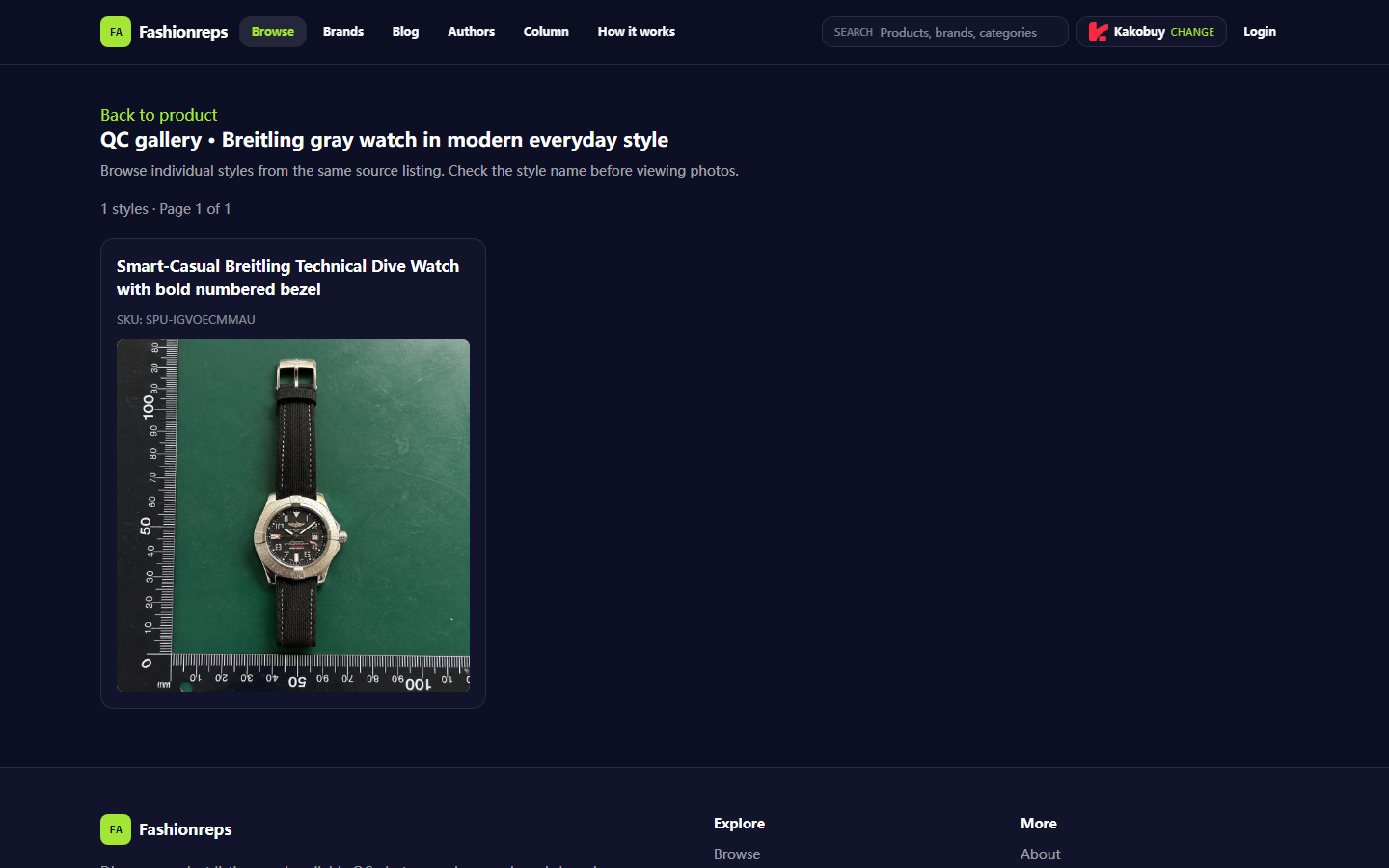
The currently visible Fashionreps QC page shows the page name as "Breitling gray watch in modern everyday style", the style name within the page as "Smart-Casual Breitling Technical Dive Watch with bold numbered bezel", and the SKU as SPU-IGVOECMMAU. The page also shows only 1 style, and the QC page includes a product image entry.
These fields serve only as identification clues for the current page, not proof of brand authenticity, movement model, case material, water resistance, size accuracy, or long-term durability. When checking, save the following simultaneously:
- Product page name
- Style name and SKU
- Color, appearance description, and visible specs
- Status of the product page and QC page
- Recognizable details in images: dial markers, crown, strap, and packaging
- Verification date and shopping agent used
If different pages only share the word "Breitling" but lack the same SKU, style name, or corresponding image details, treat it as unconfirmed, not as the same model.
What visible fields to record on the fashionreps product page
It's recommended to first complete a static record within Fashionreps before opening the shopping agent. Don't save only the product title during recording, because titles may be editorialized names and cannot serve alone for product identification.
| Check item | Current visible information | What still needs confirmation |
|---|---|---|
| Page identity | Fashionreps product and QC pages | Whether pages are still accessible, redirected, or content changed |
| Product object | Breitling gray watch in modern everyday style | Specific dimensions, materials, movement, accessories, and color variants |
| Style | Smart-Casual Breitling Technical Dive Watch with bold numbered bezel | Whether it exactly matches the target style |
| SKU | SPU-IGVOECMMAU | Whether the identifier can be retained or matched when ordering via agent |
| QC | Page shows QC photos entry | Whether the number of images, angles, time, and details are sufficient for judgment |
| Purchase path | Buy button enters the selected shopping agent | Whether the agent currently supports the product, order status, and fees |
The visible "QC photos" only indicate that the page provides a QC image entry, not a substitute for checking each image's content. Focus on dial printing, marker arrangement, hand positions, bezel, strap connection, case back, and packaging; if images are blurry, lack angles, or missing key parts, mark as insufficient evidence.
How to find corresponding pages on other platforms using the same fields
The Fashionreps page shows that the Buy button enters the user-selected shopping agent. The visible agent options include Superbuy, Mulebuy, JoyaGoo, USfans, Sugargoo, Litbuy, iTaobuy, Oopbuy, Hipobuy, CNFans, AllChinaBuy, CSSBuy, Orientdig, Weidian, and others.
These names only prove that the page provides multiple agent entries, not that each platform has an independent product page for this item, nor that their prices, inventory, shipping, warehousing, QC services, or after-sale policies are the same. When comparing, repeat the following steps for each candidate agent:
- Enter the agent page from the same Fashionreps product entry.
- Confirm that the agent page still points to the same SKU, style, or source information.
- Check product status, available quantity, and page update time.
- Record product amount, domestic shipping, service fees, warehousing fees, and possible international shipping costs.
- Check whether the agent provides warehouse inspection photos, quality inspection, return window, and handling instructions for abnormal orders.
- Save the order summary before payment, confirming destination country, currency, and shipping method.
If an agent can only find a similar-looking watch through keyword search but cannot match SPU-IGVOECMMAU or the original style name, it should not be treated as the same product for price comparison. 📋
How to compare product images, QC evidence, and link status in layers
When comparing evidence, it's recommended to use three layers.
The first layer is object evidence, including SKU, style name, color, and page source. It answers "Is it the same product?"
The second layer is appearance evidence, including main product images and QC photos. It answers "What visible details does the page show?" Images can help spot issues with markers, printing, scratches, missing accessories, but cannot prove that unshown parts are flawless, nor that materials and functions meet advertised standards.
The third layer is transaction evidence, including agent order pages, amount details, inventory status, warehouse entry records, and shipping methods. It answers "Can I buy it, and who is responsible for which step after purchase?" Fashionreps' product discovery pages cannot replace transaction records on the agent's website.
Pause when any of the following occurs:
- Product page opens, but QC page is invalid or shows empty content
- QC images are inconsistent with style name
- Images only show the front, preventing inspection of key parts
- Agent page lacks clear product object or order details
- Product amount, inventory, or fees appear only in old screenshots
- Page redirects to tag pages, search pages, or similar products with unconfirmable sources
- Agent requires bypassing normal order process, or cannot provide a savable order record
Which fees and support information must be confirmed item by item before ordering
Before ordering, confirm at least four types of fees: product amount, domestic shipping from source, agent service or warehousing fees, and international shipping to destination. Taxes, customs fees, and import restrictions depend on destination country, declaration documents, shipping route, and local rules, and cannot be inferred from QC information on the product page.
Also confirm whether the agent supports this product type, provides warehouse inspection, allows returns/exchanges when images don't match the page, and the cancellation time window. Don't treat "having QC photos" as the agent guaranteeing authenticity, brand authorization, or functional performance.
When dealing with tariffs and customs, prepare documents based on the real product and real value, and do not use under-declaration, order splitting, or other methods to evade duties or inspections. 📦 Any page requiring ID, address, or payment information should be confirmed as the selected agent's official transaction page, and avoid posting full order details, shipping labels, or payment info in public forums.
Pause conditions when pages are missing or object is inconsistent
The safest pause condition is "inability to close the loop": when the Fashionreps product page, QC page, and agent order page lack corresponding product identifiers, or any step relies only on vague images and speculation.
After pausing, you can save the page title, SKU, screenshot time, and missing fields, and wait for page recovery or ask the agent. But before getting a clear reply, don't resubmit the order, and don't substitute another similar product for the original. If the page has redirected, shows 404, becomes empty, or only shows a tag list, re-verify the source and don't treat old data as current inventory.
Final action: save the breitling watch platform path verification table
It's recommended to create one record per candidate agent, containing at least: product name, style name, SKU, Fashionreps page status, QC page status, agent name, agent product status, product amount, known fees, destination country, verification date, missing information, and final decision.
The final decision should fall into three categories:
- Continue verification: object matches, but fees, inventory, or after-sales info is incomplete
- Pause: object, QC, or purchase entry cannot be matched
- Proceed to agent checkout: object, order summary, fees, and applicable conditions have been re-confirmed on the actual agent page
The savings from this method come from avoiding mistaking similar products for the same one, reducing returns and duplicate orders due to object errors, not from guaranteeing that a particular agent is cheaper. The added costs are the time needed for recording, screenshotting, and item-by-item checking, and possibly giving up a low-price page with incomplete information.
It suits buyers who need to compare multiple purchase entries, value QC evidence, and are willing to save records before payment. It doesn't suit those who want to order immediately based only on brand terms, a single image, or old prices. If product information, QC evidence, and agent transaction information cannot correspond, the safest action remains to pause the purchase.
Continue reading