From the blog
Verify Omega Watches Across Platforms
To determine whether Omega watch links on different agent platforms correspond to the same purchase task, you cannot rely solely on the product name or the thum...
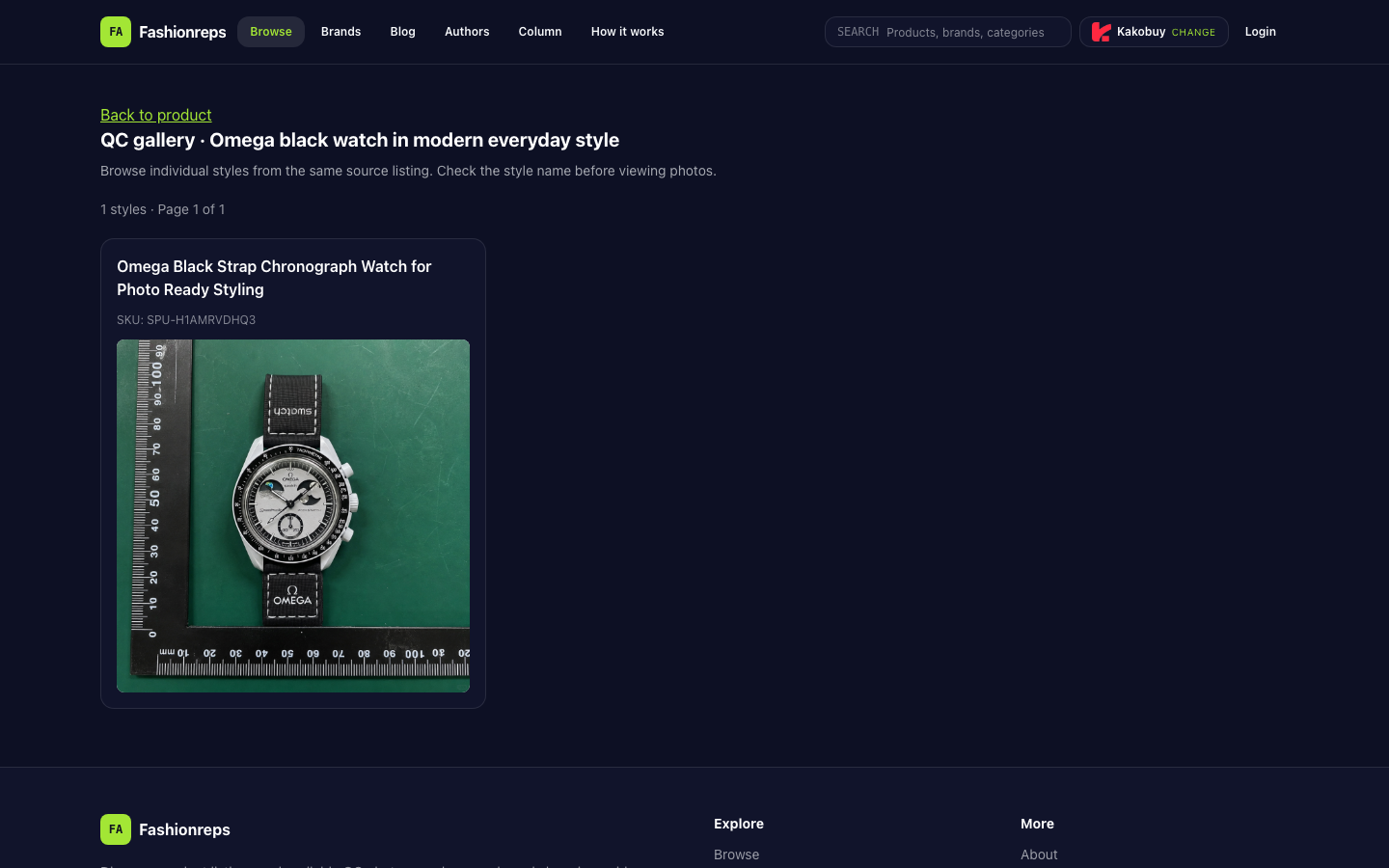
To determine whether Omega watch links on different agent platforms correspond to the same purchase task, you cannot rely solely on the product name or the thumbnail in search results. A safer approach is to first pin down the same product entry, then separately verify the product identity, service boundaries, and final checkout conditions. The currently verifiable page shows that Fashionreps has a QC page for an Omega black strap chronograph watch, with the style name listed as "Omega Black Strap Chronograph Watch for Photo Ready Styling" and SKU "SPU-H1AMRVDHQ3". The page also states that it is a style browsing page for the same source product, with only 1 style.
First confirm if it's the same product record
The first step in cross-platform verification is not to compare prices, but to establish a product identity record. At least the following fields should be saved:
- Product title, including color, material, style, and functional description
- SKU, product number, or other unique identifier from the source page
- Product main image and detail images, especially identifiable parts such as the dial, strap, buckle, and case back
- Number of styles, and the currently selected specific style
- Correspondence between the product page and the QC page
- Inventory, purchase availability, or pending confirmation status shown on the page
This verifiable page only supports the fact that Fashionreps' QC page corresponds to an Omega black strap chronograph watch record, with SKU SPU-H1AMRVDHQ3 and a QC image entry. It alone cannot prove that a same-named product, similar image, or same brand entry on other agent platforms is the same item.
If a candidate platform does not show the same SKU, or can only be matched by fuzzy image comparison, it should be recorded as "possibly corresponding" rather than directly marked as the same style. If the title, SKU, image, and style fields conflict with each other, pause the comparison and go back to the original product page for confirmation.
Distinguish between Fashionreps page and agent services
The Fashionreps page serves product discovery and QC information display. The purchase platform selector on the page lists multiple external agents, including Kakobuy, Superbuy, Mulebuy, JoyaGoo, USfans, Sugargoo, etc. The page also clearly indicates that the Buy button will enter the selected agent; ordering, payment, and shipping are handled by the agent's website.
This means that the product facts on the page and the agent's fulfillment services cannot be conflated:
- Fashionreps page can be used to confirm the source product, style name, SKU, and QC page entry.
- The agent page is where you confirm ordering, payment, warehousing, QC services, return/exchange conditions, and international shipping rules.
- The presence of an agent listed on the Fashionreps page does not prove that the agent currently accepts this product link, nor does it guarantee product quality, inventory, or shipping outcomes.
- If the product link undergoes redirects, parameter conversion, or re-searching, you should re-verify the product title, SKU, and images; you cannot judge correspondence based solely on successful redirect.
Record each platform with the same set of fields
For each candidate agent, it is recommended to record the following in order before the product reaches the checkout page:
- Paste the same source product link and confirm whether the agent can recognize the original product.
- Record the product title, images, SKU, style options, and quantity limits returned by the agent.
- Check whether the page shows availability, pending inquiry, invalid, out of stock, or requires manual confirmation.
- Confirm the currency of the product price, and whether there are additional service fees, payment processing fees, or other surcharges.
- Check whether QC images after warehousing are provided, and whether QC is a basic, paid, or optional service.
- Record storage period, return/exchange conditions, after-sales window, and customer service contact.
- Go to the final checkout page and confirm international shipping cost, route, insurance, tax notice, and total payment.
Only when all these fields correspond to the same product and the same shipping destination does price or service comparison become meaningful. Different agents may use different exchange rates, shipping routes, or service packages, so you cannot directly use individual prices on the page as a total cost ranking.
Facts, pending fields, and stop-payment conditions
You can split the verification results into three columns to avoid treating speculation as conclusion:
| Category | Content to record | Current handling |
|---|---|---|
| Page facts | Product title, SKU, images, QC page, number of styles | Based on actual content displayed on the source page |
| Pending fields | Whether agent accepts the link, inventory, service fees, QC scope, warehousing, and shipping | Must be confirmed on the corresponding agent page or checkout page |
| Stop-payment conditions | SKU mismatch, obvious image discrepancy, link invalid, unclear inventory status, unexplained fees | Pause payment and re-verify source |
Current evidence is insufficient to support ranking of prices, shipping, inventory, or service quality among different agents, nor to prove that a particular platform is definitely more suitable for this watch. In particular, you cannot infer that an agent has completed product review or guarantees after-sales results just because it appears in the selector.
Review order before final checkout
After completing product identity verification, proceed to the final checkout page. It is recommended to check in the following order:
- Is the shipping country, region, and postal code filled correctly?
- Does the product title, style, quantity, and amount on the checkout page still match the source record?
- Are product costs and service fees shown separately?
- Have exchange rates and payment fees been clarified?
- Are the route, weight bracket, and additional services corresponding to international shipping displayed?
- Do QC, warehousing, return/exchange, and insurance terms apply to this order?
- Does the page show any restrictions requiring manual confirmation?
If the checkout page only shows a total amount without explaining the breakdown of product, service, and shipping, mark the fee structure as insufficiently disclosed rather than assuming a lower price. If the page changes the product title, style, or SKU before payment, stop payment and go back to the product source page for comparison.
Conclusion
When verifying Omega watch links across platforms, the most important thing is not to find an absolute winning agent, but to confirm three layers of relationships: whether the source product is identical, whether the agent provides clear and applicable services, and whether the final checkout fields are comparable under the same shipping conditions.
Currently confirmable is that Fashionreps' QC page corresponds to an Omega black strap chronograph watch record named "Omega Black Strap Chronograph Watch for Photo Ready Styling" with SKU "SPU-H1AMRVDHQ3" and provides a QC image entry. The inventory, prices, exchange rates, fees, QC scope, and international shipping of other agents should still be based on their respective current pages and final checkout pages. Until these fields are confirmed item by item, you should not treat same-named links as the same product, nor make platform rankings or payment decisions based on them.
Continue reading