From the blog
Real Madrid Jersey Picks: Catalog vs Google Sheets
First, clarify what this organization should solve If your goal is to organize Real Madrid jersey candidates, the point is not to copy all the text from product...
First, clarify what this organization should solve
If your goal is to organize Real Madrid jersey candidates, the point is not to copy all the text from product pages, but to separate two types of information: which content is better viewed in a product catalog, and which fields need to go into Google Sheets for further filtering, deduplication, and tracking.
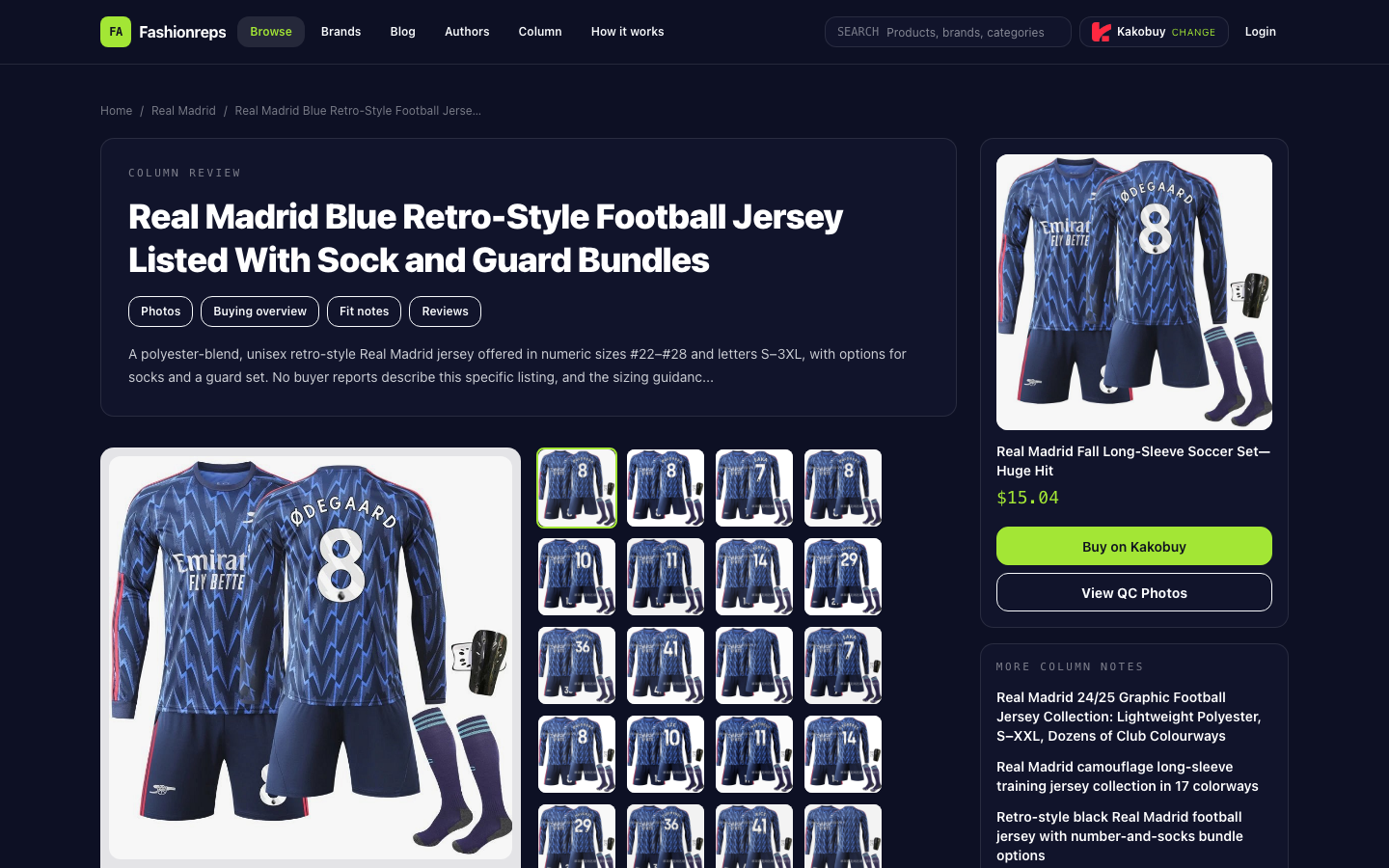
Currently verifiable candidate page is a blue retro-style long-sleeve Real Madrid jersey. The page lists polyester outer and lining, unisex cut, spring-summer-autumn wearing description, and numeric sizes #22–#28 plus alpha sizes S–3XL. The page also lists multiple number options, including 7, 8, 10, 11, 14, 29, 36, 41, and no number, and offers sock combo and protective gear set variants. The page does not provide buyer reports for this item, so we cannot confirm actual fit, fabric feel, or build consistency from the catalog page alone.
What to record in the catalog
The value of a product catalog is preserving the original context of an item. When opening a candidate page, first record the fields that can lead you back to the product:
- Product title and category
- Product page images, along with the style information corresponding to each image
- Color, pattern, or retro style descriptions listed on the page
- Number, size, and combination options
- Product ID or variant identifiers identifiable on the page
- Product page link and time of page review
- Reference price displayed on the page
- Presence of QC photos or other product evidence
This page shows a reference price of $15.04, and the page also reminds that final product price, service fee, and international shipping need to be confirmed on a shopping agent website. Therefore, in the catalog you can save $15.04 as a reference price, but you should not write it as a landed cost including service fees and shipping, nor use it to judge current stock or final purchase availability.
The catalog is also good for checking the relationship between images and variants. For example, number options, sock combos, and protective gear sets all appear on the same product page. When browsing, you should first confirm whether they are selectable variants of the same product or separately displayed combos on the page. You cannot automatically merge different combos into a single candidate just because the images look similar.
What fields to add in Google Sheets
As the number of candidates grows, catalog pages are not suitable for filtering and status management. Google Sheets can break each candidate into comparable records and preserve evidence gaps.
At least the following fields are recommended:
| Field | Purpose | What to record for this candidate |
|---|---|---|
| Candidate ID | Distinguish products and variants | Generated by organizer, not the same as platform product ID |
| Product title | Return to original page | Real Madrid long-sleeve jersey description in the page title |
| Style or pattern | Remove duplicate displays | Blue, retro style; season field missing |
| Number options | Determine if same style or different variants | #22–#28, plus 7, 8, 10, 11, 14, 29, 36, 41, no number |
| Size range | Filter by needs later | S–3XL, #22–#28 |
| Combo variants | Prevent accessories from being mistaken as separate products | Jersey only, sock options, protective gear set options; need to confirm on page |
| Reference price | Record catalog display value | $15.04; fees and shipping unconfirmed |
| Image evidence | Check if images correspond to variants | Page images or QC photos; cannot assume images cover all numbers and combos |
| Season info | Identify duplicate or specific versions | Not provided on current page; mark as missing |
| Link status | Determine if recheck needed | Save page link, last check date, and recheck result |
| Candidate status | Manage next actions | To verify, to supplement evidence, duplicate, on hold, or confirm before purchase |
The key of the sheet is not to add more descriptions, but to separate "seen," "not provided," and "not yet confirmed." For example, the page explicitly lists polyester outer and lining, so you can record it as a page claim; but without independent evidence, do not expand it into conclusions about breathability, durability, or wearing comfort.
How to deduplicate numbers and variants
The most common duplicates in such catalogs are not necessarily identical pages, but different numbers, accessory combos, and image displays under the same page. You can organize them in three layers:
- First use the product page link as the main record to determine if it is the same original page.
- Then distinguish variants by number, no-number status, sock options, and protective gear set.
- Finally check whether images, titles, and descriptions still point to the same style.
Do not treat #22–#28 and S–3XL as interchangeable size systems. The page lists both numeric and alpha options, but does not provide a conversion chart between them. If you need to purchase, follow the seller's measurement chart and record "size system mapping incomplete" in the sheet, rather than deriving correspondence yourself.
Similarly, do not judge jerseys as different styles just because numbers differ. Numbers may be only printing options; only when images, colors, cuts, or product descriptions also change is there enough reason to split them into different style candidates.
Division of labor between catalog and sheet
You can think of the two as tools for different stages:
- Catalog is for discovering candidates, viewing original images, reading product descriptions, and returning to product pages.
- Google Sheets is for filtering numbers and sizes, marking missing fields, merging duplicate pages, recording recheck times, and assigning tasks.
- Page evidence from the catalog should be kept in the source field of the sheet, to avoid leaving only text out of context.
- Status in the sheet cannot replace product page recheck; when links break, page content changes, or variant descriptions are unclear, you should reopen the catalog page to confirm.
Therefore, the sheet is not a replacement for the catalog. It is better for answering "which candidates are missing season fields," "which pages may be duplicates," and "which numbers need recheck," while the catalog is better for answering "what does the product page actually show."
An executable organizing workflow
Step 1: Create original candidate records first
Each time you find a page, create only one original page record, saving title, link, main image, displayed price, and page check time. Do not split all numbers into dozens of rows at the start; otherwise you may easily miscount variants of the same page as multiple independent products.
Step 2: Add variant records
After confirming the numbers, alpha sizes, sock and protective gear options listed on the page, create variant fields in the sheet. If the page does not explain which option corresponds to which image or specific differences, mark it as "to confirm on page," and do not add speculative content.
Step 3: Mark missing evidence
This page lacks buyer reports for the specific item, and existing discussions about sizing of China-sourced jerseys are inconsistent: some reports suggest following the measurement chart or sizing up one to two sizes, while others say replicas run close to normal size. Therefore, in the sheet, mark size conclusions as "cannot be judged uniformly," and require checking the seller's measurement chart before purchase.
Step 4: Do duplicate checks
Check by product link, title, color, pattern, and variant combinations. Even if two pages have similar titles, do not merge based on title alone; also compare images, number lists, and combo options. Keep records that cannot be confirmed as identical as "to verify," rather than forcing deduplication.
Step 5: Recheck before ordering
Before making a final decision, re-confirm four sets of information:
- Whether the number is still the option you need
- Whether the size is chosen according to the current seller's measurement chart
- Whether product images match the target color, pattern, and combination
- Whether the page link is still valid, and whether price, service fee, shipping, and stock are re-confirmed on the shopping agent page
How to place the current candidate in the catalog
This Real Madrid jersey can be kept as a "candidate to verify," not directly marked as a verified recommendation. In the catalog, you can keep its blue retro style, polyester outer and lining, number and size options, sock and protective gear combos, and $15.04 reference price. In Google Sheets, you should add the season field, correspondence between variants and images, link recheck date, size evidence status, and final price confirmation status.
If your filtering goal is to find a specific season, a specific number, or jersey only, the current page still needs further verification. It is suitable as a catalog candidate with clear variant information, but existing evidence is not enough to confirm actual wearing size, workmanship of specific variants, or final purchase cost.
Continue reading