From the blog
Palm Angels Cargo Pants: Fashionreps & Google Sheets Roles
fashionreps website catalog and Google Sheets solve different parts of the same buying process: the former helps discover candidate products, view images, and e...
fashionreps website catalog and Google Sheets solve different parts of the same buying process: the former helps discover candidate products, view images, and enter product pages; the latter helps organize specs like waist, length, color, and link status into a filterable and reviewable record. For buyers looking for palm angels cargo pants, the most important thing is not to first decide which item is "best," but to confirm whether qualified products actually exist in the current catalog, then decide whether to move to detailed spec review.
This article focuses on one specific task: building candidates from the Palm Angels category on fashionreps, then using Google Sheets to check product specs and link status. After reading, you should be able to complete a reviewable candidate screening. If you already have clear product links, complete size charts, or warehouse QC photos, this article can only help with organizing and checking, and cannot replace product pages, agent pages, or actual QC evidence.
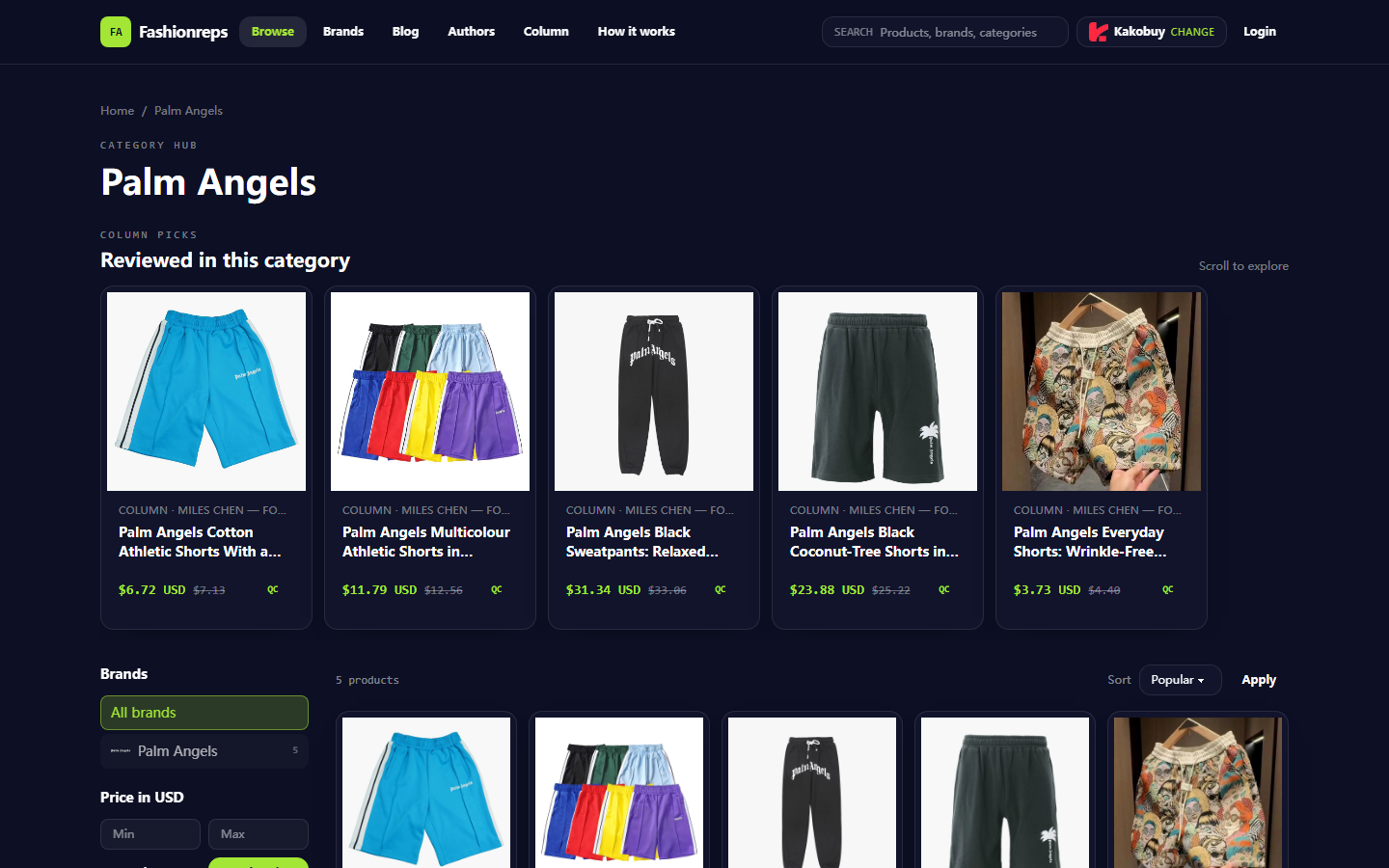
Image: Screenshot of the Palm Angels category page on fashionreps. This page is used to illustrate catalog navigation and product card information; it does not indicate that eligible cargo pants appear in the screenshot.
What screening task this palm angels cargo pants comparison solves
The screening task can be concretely written as four steps:
- Confirm on fashionreps whether there are Palm Angels cargo pants candidates.
- Record product name, visible sizes, colors, reference price, and product page link.
- Mark in Google Sheets which information has been verified and which is still missing.
- Before making a purchase decision, return to the product page to check the latest status, and keep necessary QC or after-sales check links.
The currently visible Palm Angels category page shows 5 products, including cotton drawstring sports shorts, polyester multicolor sports shorts, black letter-print sweatpants, black palm tree pattern shorts, and everyday polyester shorts. The page also shows price filter, sorting, brand filter, and QC entry, but the visible product names do not explicitly include cargo pants or work pants.
Therefore, at this stage, we cannot conclude from the Palm Angels category page alone that fashionreps offers eligible cargo pants. The correct action is to first check search results, other related categories, or accessible product pages; if no clear cargo pants names and specs are found, mark the result as "pending evidence," rather than treating sweatpants or shorts as cargo pants.
Evidence boundaries between fashionreps website catalog and Google Sheets
fashionreps is better at answering "what candidates exist" and "what product evidence can I see." Product cards help buyers quickly check name, reference price, brand, and QC entry, and narrow down through sorting, filtering, or image browsing. The page also clearly states that product purchases go to the shopping agent of your choice, and orders, payments, and shipping are handled on the agent's website.
Google Sheets is better at answering "what have I verified" and "which candidates still cannot be compared." It does not automatically replace the product page, nor does it automatically prove inventory, actual material, seller reliability, or QC results. "Confirmed" in the sheet only means you saw the corresponding page information on a certain date; it should not be understood as a long-term valid promise.
| What needs to be judged | Evidence fashionreps is suited to provide | Work Google Sheets is suited to complete |
|---|---|---|
| Is it cargo pants | Product name, category, visible images, and description | Record classification conclusion and reason for pending confirmation |
| Size specs | Visible sizes, measurement images, or size chart on product page | Record waist, length, measurement unit, and missing fields |
| Color and fit | Product images and description | Standardize color notation, avoid duplicate records of the same item |
| Link status | Whether product page is accessible | Save check date, status, and recheck result |
| QC entry | Whether the page provides a QC viewing link | Record whether viewed and whether evidence is sufficient |
Build candidates on fashionreps by category, keywords, and product cards
The first step is to start from the Palm Angels category page, rather than directly treating "palm angels cargo pants" as an established product conclusion. First observe the brand filter, price filter, and sorting options on the category page, then look at the complete product names in the cards.
It is recommended to build candidates in the following order:
- First use the brand filter to confirm the page is still within Palm Angels scope.
- Then check whether product names explicitly contain words like cargo, utility, pocket, or work pants that support classification.
- Check whether images show design cues like side pockets, 3D pockets, drawstrings, or leg structure, but do not write image observations as conclusions about touched material or actual fitting.
- Open the product page and confirm whether product name, sizes, colors, price, and QC entry are still visible.
- For pages that cannot open, redirect, are blank, or only have tag information, mark them as unavailable candidates.
The visible product cards on the current category page show reference prices, e.g., cotton sports shorts at $6.72, polyester multicolor sports shorts at $11.79, black sweatpants at $31.34. Since these prices are reference prices shown on the page and the product names do not exactly match cargo pants, they cannot be directly used as the price range for palm angels cargo pants, nor can they be used to calculate final order cost.
📌 A reliable candidate requires at least three things at the same time: "clear name, accessible page, sufficient specification information." Only product image similarity cannot enter the confirmed list.
Record waist, length, color, and link status in Google Sheets
The goal of the sheet is not to copy all page content, but to enable each candidate to answer three questions within seconds: what is it, whether the specs are sufficient, and what evidence is still missing for the next step.
Recommended fields are as follows:
- Product name: keep the complete name visible on the page.
- Category judgment: cargo pants, sweatpants, shorts, or pending confirmation.
- Waist: record the original value and unit; do not write only "runs large" or "runs small."
- Length: record the value from the product page or measurement image; if no data, write "not provided."
- Color: record exactly as on the page, then supplement with a standardized color category.
- Reference price: note the currency and keep the "reference price" attribute.
- Product page link: save the revisitable product page URL.
- Link status: accessible, redirect, blank page, 404, pending review.
- QC entry: yes, no, not checked.
- Last verification date: record the date you actually checked the page.
- Notes: write missing fields, classification basis, or content needing recheck.
Google Sheets' filter feature is suitable for quickly finding candidates where "category judgment is cargo pants, waist is filled in, and link status is accessible." The color column helps you filter black, brown, or other specified colors, but do not use color filter results to replace product images and product page descriptions.
Compare mobile browsing, image viewing, filtering, and rechecking steps
The advantage of mobile browsing is quickly viewing product cards, images, and category structure, suitable for continuous judgment during the discovery phase of "is this worth opening." Its limitation is limited field space, making it harder to compare waist, length, and link status side by side across multiple products.
The advantage of Google Sheets is putting candidates in one view for filtering missing information, removing duplicate products, and rechecking previous judgments. Its limitation is that it does not automatically update the fashionreps page, nor does it verify whether links are still valid. The sheet saves verification records, not a real-time inventory system.
A more reliable mobile browsing plus sheet rechecking workflow is:
- Discover candidates on the fashionreps category page.
- Open the product page and first confirm category and product name.
- Enter original specs into Google Sheets without filling in missing values on your own.
- Return to the product page to check images, colors, sizes, and QC entry.
- Update link status and last verification date in the sheet.
- Only when key fields are sufficiently complete, go to the agent page to continue checking purchase, order, and shipping conditions.
🧾 If the image seen on mobile and the product name cannot support each other, the sheet should record "inconsistent evidence" rather than interpreting on behalf of the page.
Use the same sheet to verify product page specs, QC entry, and update time
The same sheet can serve both candidate management and review management, but each update should distinguish "information seen on the page" from "editor judgment." For example, if the product page says "relaxed cut," the sheet can keep the original text and note "relaxed fit description" in the remarks; do not further infer specific leg dimensions.
When reviewing, check in sequence:
- Whether the product name still matches the original record.
- Whether the product category is supported by name, image, or description together.
- Whether waist and length have clear values, units, and measurement method.
- Whether the color comes from the product page, not just thumbnail guessing.
- Whether the reference price is still displayed and the currency is clear.
- Whether the QC entry can be opened and whether there are images or information sufficient to help judgment.
- Whether the last check date of the page has expired and needs revisiting.
The QC entry itself is not a quality guarantee. It only shows that the page provides a link for further viewing; whether there are clear photos, whether key parts are covered, and whether sizes and workmanship can be verified still need to be judged based on actual visible content. If QC images are missing, inaccessible, or insufficient, mark the status as "insufficient evidence."
How to stop judgment when information is missing or link status is unclear
Stopping judgment is not giving up, but avoiding turning incomplete evidence into purchase advice. Suspend marking candidates as purchasable when:
- Product name does not clearly state cargo pants.
- Only images, no verifiable specs.
- Waist or length missing, and no measurement image on the page.
- Link redirects, 404, blank page, or cannot confirm product identity.
- Color can only be guessed from thumbnail, with no text or clear image support on the product page.
- QC entry exists, but actual content is inaccessible or insufficient to check key parts.
- Reference price still visible, but inventory, agent price, or final shipping cost has no verifiable information.
At this point, you can use the "pending evidence" status in Google Sheets and clearly state what needs to be supplemented. For example, "need product page size chart," "need to confirm if it's cargo style," "need to recheck link." This way, the next recheck can continue directly without browsing all candidates again.
⚠️ Do not use low price, brand name, or similar images to fill missing evidence. They at most help discover candidates, but cannot prove specs, inventory, or final purchase conditions.
Combined workflow: keep candidates, supplement evidence, or defer
Candidates can be divided into three groups:
Group 1 is "keep candidates." Product name is clear, page is accessible, key fields like waist, length, and color are basically complete, and QC entry can be further checked. This group is suitable for moving to agent page verification.
Group 2 is "supplement evidence." Product may be relevant but missing one or two key fields, e.g., only length without waist, or clear images but incomplete color name. This group can be kept, but should not be recommended alongside complete candidates.
Group 3 is "defer." Page inaccessible, category unclear, conflicting information, or insufficient QC content. This group should keep the reason to avoid opening the same invalid link again.
If a product requires multiple external pages to piece together complete specs, the sheet should record the source and date of each piece of evidence. If it still cannot be confirmed, stop judgment; do not use average sizes, common sizes, or other products' descriptions to replace current product data.
Next step: build a palm angels cargo pants verification sheet
First, create the following minimum columns in Google Sheets: product name, category judgment, waist, length, color, reference price, product page link, link status, QC entry, last verification date, notes.
Then build the first batch of candidates from the Palm Angels category page on fashionreps. The current visible page is more suitable as a catalog navigation sample because it shows brand filter, price filter, sorting, product cards, and QC entry, but visible product names are mainly shorts and sweatpants, not enough to confirm the existence of clear cargo pants candidates.
After the first organization, prioritize rechecking products with category judgment "pending confirmation," then handle candidates with missing specs. Only when product identity, size information, color, link status, and necessary QC evidence can all be reviewed, go to the agent page to continue checking ordering, costs, logistics, and after-sales conditions.
The value of this division of labor is that fashionreps handles discovery and evidence viewing, while Google Sheets handles recording and filtering evidence. It can reduce repeated page opening and the risk of mistaking similar products for the target item, but it does not eliminate uncertainty from link changes, missing specs, or product page updates.
Agent platform shopping FAQ
1. On fashion-reps, what steps should I take if the item I received does not meet my expectations?
Reach out to your agent's support staff without delay. For most non-specialty goods, Chinese sellers on fashion-reps allow a 5-day unconditional return or exchange. If you're unhappy, a return can be requested. Should the package already be delivered to you and you notice a defect, contact the agent's customer service so they can connect with the merchant to work out compensation. Customer service emails: kakobuy: service@kakobuy.com, oopbuy: support01@oopbuy.com, usfans: support@usfans.com, hipobuy: care@hipobuy.com, superbuy: care@superbuy.com
2. What is the reason for not relying on Google Sheets on fashion-reps?
Google Sheets works only for spreadsheets containing very few products. As the product count grows, loading becomes sluggish and the interface lags badly. On phones, it looks terrible and searching for items is a hassle. For identical product lists, the spreadsheet on the fashion-reps website opens faster and gives a much better viewing experience.
3. Which product categories can I browse on fashion-reps?
Fashion-reps carries a broad selection: shoes, T-shirts, sweaters, hoodies, jeans, sweatpants, shorts, beach shorts, factory clearance items, down jackets, baseball jerseys, shirts, hats, jewelry, bags, electronics, sunglasses, socks, underwear, and trendy collectibles.
4. How can I locate a specific item I want to purchase on fashion-reps?
You may enter one keyword or head straight to the category section, where goods are also sorted by brand. Longer queries tend to produce fewer but more accurate results. For instance, try "Air Force 1 White," "sneakers," or just "Air Force 1."
5. For what purpose does fashion-reps make use of spreadsheets?
Because agent platforms usually do not show products directly, a spreadsheet is needed to browse for items and obtain their purchase links. Alternatively, you can look for suggestions on Reddit or Discord; the products recommended there are often high quality, but the buying process is slow. These spreadsheets are generally built over a long time by collecting information from those communities.
Continue reading