From the blog
Orlebar Brown Accessory Shortlist: Catalog & Google Sheets
First, Confirm What's Actually in the Catalog If your task is to curate candidates from Fashionreps' Orlebar Brown brand page, the first step isn't to copy prod...
First, Confirm What's Actually in the Catalog
If your task is to curate candidates from Fashionreps' Orlebar Brown brand page, the first step isn't to copy product names directly, but to confirm the catalog range currently displayed on the page. The verified page shows the brand entry has two category tabs: Accessories 6 and Slippers 6, and the page also displays 6 products. The currently visible product cards are all slipper-type items, so you can't treat them all as different types of accessories just based on the "Accessories" category name.
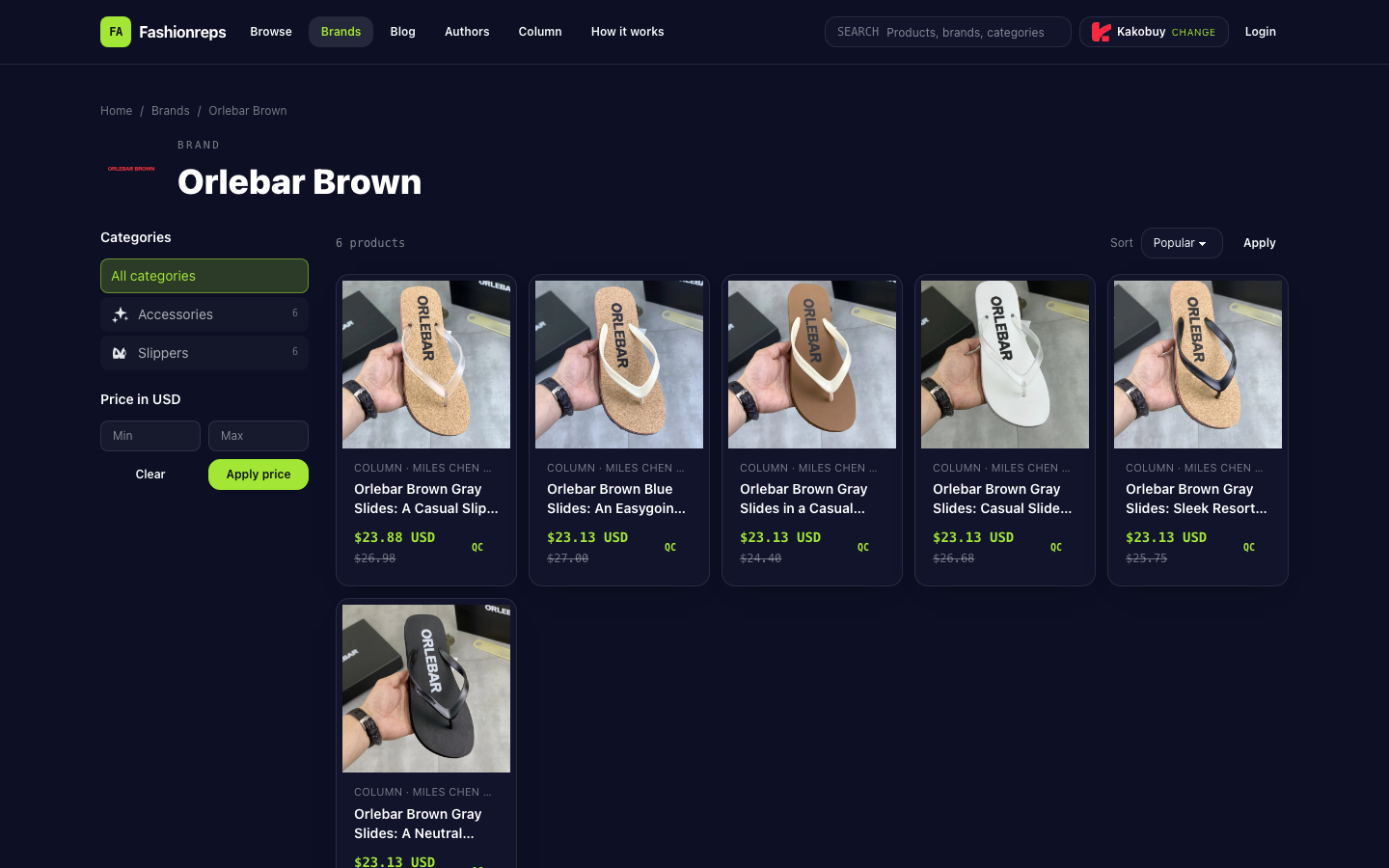
The page also provides price range filtering, sorting options, and brand filtering. Product cards include title, reference price, original reference price, author information, and a QC entry. The bottom of the page explains that Fashionreps is for discovering products, viewing source-based shopping guides and QC images; orders, payments, and shipping are handled by external shopping agent websites. Therefore, the table should record these as "catalog candidates," not a confirmed purchasable product list.
Record Catalog Fields Completely First
It's recommended to copy exactly what the page currently shows on each card before making judgments. Don't add material, stock, shipping, sole structure, or suitable audience information based on the title.
At least keep the following fields:
- Brand: Orlebar Brown
- Product name: Record as shown on the page card, e.g., Gray Slides or Blue Slides
- Color: Only fill in when the page title or product details explicitly show it
- Size: When the page clearly shows 38–46 or EU sizing information, keep the original expression
- Current reference price: Record the USD amount separately and mark it as reference price
- Original reference price: Keep separate from current reference price to avoid mistaking it as a discount
- QC status: Record whether the page provides a QC entry, but don't treat the QC entry as a quality conclusion
- Page link: Copy the actual return address of the card and check if it still goes back to the corresponding product
- Page update time: Fill in if the page has a clear update time; otherwise leave blank
- Review status: Verified, pending specs, link issue, or excluded
- Notes: Record issues like duplicate titles, missing colors, or incomplete size expressions
In the current page examples, the Gray Slides entry has different title expressions such as 38–46, men's wide size range, or men's 38–46 EU; the Blue Slides entry uses "EU sizing" description. These can only be recorded as page text, and you can't infer that all products have the same size range.
Use Google Sheets for a Second Review
The catalog page is good for discovering candidates; Google Sheets is better for breaking candidates into fields and centrally addressing missing items. You can set up a table with one row per product card, then use filters to view different statuses.
| Review Goal | Catalog Page Suitable For | Google Sheets Suitable For |
|---|---|---|
| Find candidates | Browse cards by brand, category, and price range | Compile collected candidates |
| Check specs | Read size expressions in titles and product cards | Filter rows with empty color or size |
| Check prices | View current reference price and original reference price | Compare two columns to avoid confusing reference price with original reference price |
| Check links | Enter the corresponding page from the card | Mark addresses that redirect incorrectly, are invalid, or point to other products |
| Collaborative review | Suitable for single browsing | Suitable for assigning status, adding notes, and keeping review records |
Table statuses should be mutually exclusive. "Verified" means name, color or size, reference price, and link have all been rechecked against the page; "Pending specs" means the product is still worth keeping but key fields are not clearly shown on the page; "Link issue" means the address can't return to the corresponding product or needs reconfirmation; "Excluded" means duplicate, insufficient information for candidate use, or no longer fits the current curation scope.
Link Redirect and Variant Consistency Check
After entering links, open each one row by row and check three things: the page brand is still Orlebar Brown, the product title matches the table name, and the color and size descriptions are not misaligned. If a link returns to a brand collection page instead of a specific product page, mark it as a link issue; don't use the collection page address as a product link.
Variant checks should be based on actual page text. Color names like Gray and Blue should not be merged just because the images look similar; 38–46, men's wide size range, and EU sizing should not be rewritten uniformly without explanation. If the page only shows partial specs, leave blank and mark as pending specs rather than filling in with other entries from the same brand.
Prices also need separate review. The current page shows reference prices including $23.88 and multiple $23.13 records, with different original reference prices. These are reference data displayed on the catalog page and do not represent stock, final settlement price, shipping, or taxes. Keep the "reference price" field in the table to avoid writing it as a definite purchase cost.
Final Checklist Before Ordering
After completing the table, only pass rows that meet all the following conditions to the next step of purchase verification:
- The product title can return to the corresponding specific page
- Brand and variant names match the page
- Color and size are not filled with speculative content
- Current reference price and original reference price are not mixed in the same column
- QC entry is recorded separately from quality judgment
- The page does not show obvious problems that prevent confirming purchase status
- It's noted that orders, payments, and shipping are handled by external shopping agents
The point of this process isn't to quickly turn the 6 entries on the page into a recommendation list, but to turn catalog browsing results into traceable candidate records. The page is responsible for discovering and revisiting products, Google Sheets is responsible for filtering missing fields, marking anomalies, and preserving collaborative results; when evidence is insufficient, leaving blanks is more reliable than filling in a seemingly complete spec.
Continue reading