From the blog
Manchester City Jersey QC Mismatch Troubleshooting
Introduction When viewing Manchester City jerseys on fashionreps, if the product page displays color, size, number, or bundle options that don't match the actua...
Introduction
When viewing Manchester City jerseys on fashionreps, if the product page displays color, size, number, or bundle options that don't match the actual item in the warehouse QC photos, don't rush to pay or arrange shipment. This discrepancy could be caused by image loading errors, order item mix-ups, or the selected specs not being recorded correctly at the time of ordering.
This article addresses one issue only: the inability to match the recorded product specs with the QC photos. After reading, you should be able to do three things: confirm whether the comparison objects are the same, determine whether you need to request additional photos or contact support, and pause further actions when evidence is insufficient. This article does not apply to the return process after you've confirmed you received the wrong item, nor to customs clearance or logistics anomalies.
The following assessment is based on saved fashionreps page records dated October 12, 2026. Page information may change, so before placing an actual order, you should re-verify the product page, selected options, and order records.🙂
First, Confirm the manchester city Jersey Product Details Page and QC Entry Point
Go back to the product details page first; don't judge the product solely from browser history or chat messages. Confirm the product name, product images, color options, size range, number or printing options, and whether it includes socks, shin guards, or other bundle contents.
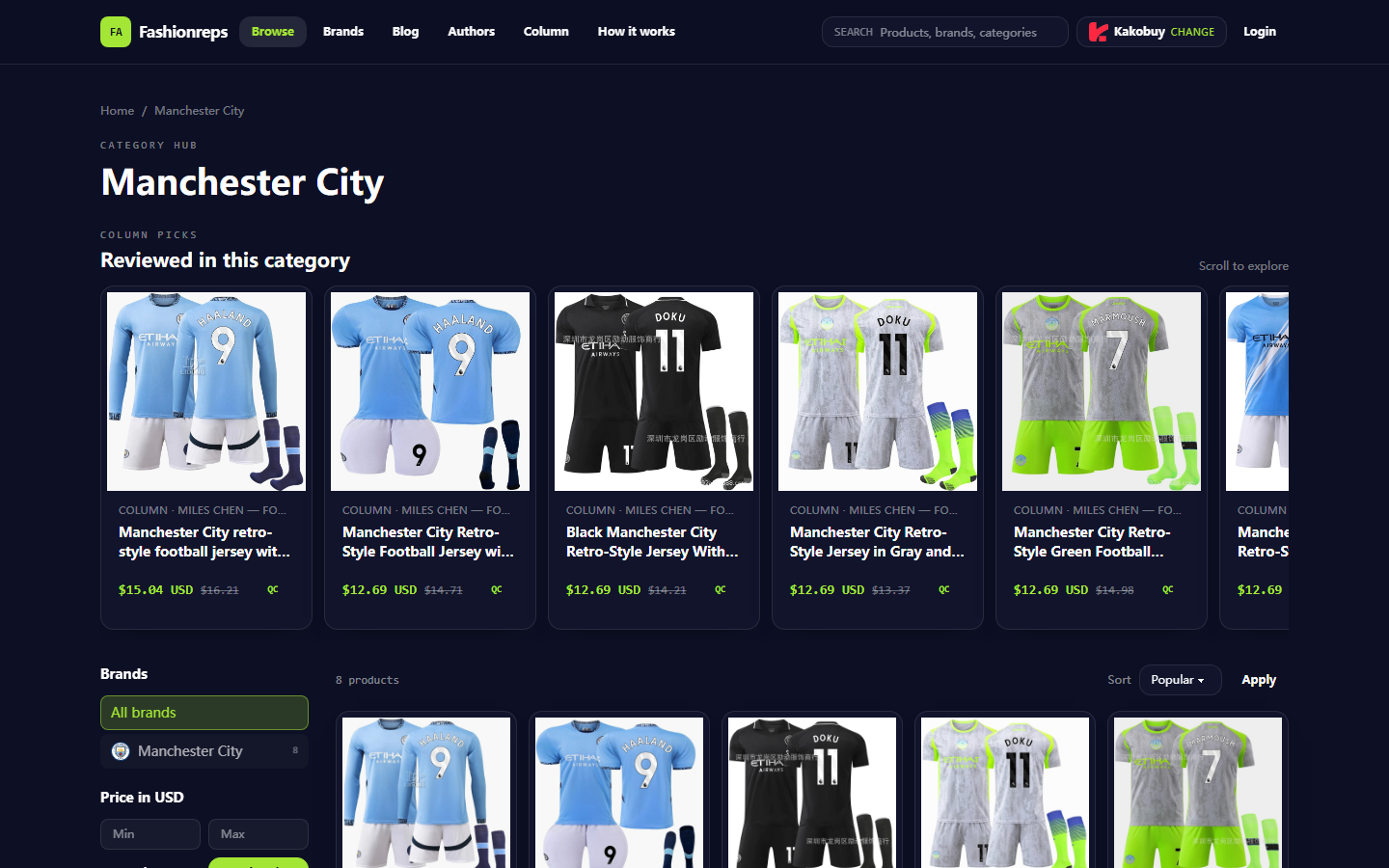
The saved Manchester City category page shows various retro-style jersey entries, including different colors, number options, sock bundles, and size ranges. The page also displays reference prices, but reference prices are not the current order amount and alone cannot prove that a particular item was correctly ordered.
After entering the QC page or order item, first record the following fields:
- Product name or product title
- Product ID or variant information corresponding to the product link
- Order number, package number, or warehouse entry identifier
- Color and size
- Number, player name, or custom printing
- Whether socks, shin guards, or other accessories are included
- Number of QC photos and shooting time
If the QC page does not show an order item identifier, don't match the photos with other jerseys in the same order. When multiple similar-looking jerseys are stored at the same time, judging solely by blue, black, or white appearance is very risky.
Record Product Specs for Color, Size, Number, or Version Comparison
Transcribe the specs from the product details page and order records item by item, then compare with the visible information in the QC photos. Do not judge the full version based solely on the main color in the photos, because lighting, white balance, and folding can alter color perception.
It is recommended to verify in the following order:
- Color: Check whether the body, collar, cuffs, and side panels match the selected color.
- Size: Check the packaging label, size tag, or warehouse record; do not use the visual size of the garment laid flat as proof of size.
- Number: Confirm whether the back number exists, is positioned correctly, and matches the order selection.
- Player name or custom text: Confirm the text content, number of letters, and arrangement direction; do not guess when it's unclear.
- Version: Distinguish between a single jersey, jersey with socks, and bundles including other accessories.
- Quantity: Confirm whether one or multiple items appear in the QC photos to avoid mixing different order items into one.
If only one field cannot be confirmed, record the status as "pending additional evidence" rather than directly judging it as a wrong delivery. Especially for numbers, printing, and size tags, confirmation must rely on close-up, clear photos or order fields.🔎
Verify Whether QC Photos Belong to the Same Product and Order Item
When photos don't match specs, the first thing to rule out is not a quality issue but a correspondence error. Check whether the QC photos have the following clues:
- Whether the photos come from the same order or warehouse task
- Whether the number of items in the photos matches the order item quantity
- Whether multiple items have different tags, packaging, or position markers
- Whether QC photos were uploaded in the same time batch
- Whether the photos show other jerseys, socks, or accessories
- Whether image files failed to load, are duplicated, or clearly come from another item
Evidence can be divided into three categories:
| Evidence Type | What It Can Confirm | What It Cannot Confirm Alone |
|---|---|---|
| Order and spec records | Which color, size, number, or bundle you selected | Whether the item actually received by the warehouse is correct |
| QC photo overall view | Whether the photos show a jersey, accessories, and quantity | Whether details on labels are accurate |
| QC photo close-ups and labels | Visible status of color, size tag, number, and printing | Whether the photo definitely belongs to that order unless it has a corresponding identifier |
If photos lack order identifiers and don't have corresponding product tags, you cannot conclude they belong to that order based on visual similarity alone. In that case, request the warehouse or support staff to confirm the association between the photos and the order item.
Distinguish Image Loading Errors, Item Mix-ups, and Spec Selection Errors
Image Loading Errors
Common signs include blank images, thumbnails not matching the full image, some images failing to open, the same image repeating, or image content changing after refresh. The handling method is to reload the page first, record the positions of abnormal images, and note the loading time. Don't immediately request a return or repurchase because of a single image display issue.
If only the display layer is abnormal, but order specs, image numbers, and other QC photos correspond mutually, you can first request regeneration or re-sending of photos. Do not treat image loading anomalies as product errors without re-verification.
QC Item Mix-ups
Common signs include color and size being roughly correct but number, socks, shin guards, or quantity not matching the order record; or multiple similar jerseys in the same package without clear markings in the photos.
The focus here is to have support staff confirm "which set of photos corresponds to which order item," rather than vaguely asking "is this my item?" Providing order number, item sequence, selected specs, and mismatched fields usually yields a verifiable response more easily.
Spec Selection Errors
If the order record itself already shows the wrong color, wrong size, or wrong number, then the QC photos may simply be accurately reflecting the wrong selection. In this case, first check whether you are still within the modification or cancellation window, then handle it according to the platform and seller support channels. Do not describe your own selection error as a warehouse mistake, as that may delay resolution.
If the order record shows correct but the QC photos show wrong, then it is a spec correspondence issue that requires focused investigation.🧾
When Additional Photos Are Needed, How to Write Verifiable Angles and Fields
The request for additional photos should be specific about "what to photograph, from where, and which field to check." Simply saying "please take clearer photos" usually doesn't resolve the correspondence issue.
You can request the following photos:
- A full flat-lay photo to confirm the jersey body, color, and quantity
- A close-up of the size tag to ensure letters or numbers are legible
- A back photo to confirm the number and player name or custom printing
- A photo of the collar label, care label, or packaging label to help confirm version
- A photo showing the order item identifier or warehouse identifier for association
- If socks or other accessories are included, photograph them separately along with quantities
Example of a photo request:
"Please take additional photos for the Manchester City jersey item in the order: full front, full back, size tag, close-up of number or printing, and at the same time confirm the order item number corresponding to this set of photos. The order record selected color, size, number, or bundle; please check each item and clearly mark any fields that cannot be confirmed."
Do not publicly disclose payment card numbers, passports, full shipping labels, or other unrelated personal information in the request. If necessary, provide only the minimal order number fields needed for location, and mask address and contact information.🛡️
Conditions for Stopping Payment and Shipment When Photos Cannot Be Matched
Before the following situations are resolved, you should pause final payment, package consolidation, or shipment:
- Cannot prove that QC photos belong to the current order item
- Color or size clearly inconsistent with the order record
- Number, player name, or custom printing cannot be confirmed
- Photos lack key labels, and support staff cannot provide the correspondence
- The same QC photo is reused for multiple different items
- Product quantity or accessory quantity does not match the order record
- Platform requires QC confirmation before proceeding, but evidence is incomplete
If it's only insufficient image resolution, but order item identifiers, spec records, and other photos can corroborate each other, you can first request additional photos without canceling the entire order. Conversely, if color, size, and number are simultaneously inconsistent, or it's impossible to determine which item the photos belong to, you should raise the risk level, stop subsequent operations, and wait for a verifiable response from support staff or the seller.
Do not handle uncertain items by under-declaring, splitting orders to avoid taxes, or evading inspection. The purpose of pausing operations is to prevent wrong items from proceeding to consolidation, shipment, or after-sales stages, not to bypass platform audits.
Final Actions: Gather More Evidence, Contact Support, or Delay Subsequent Operations
You can complete the troubleshooting in this order:
- Save key fields from the product details page, order specs, and QC photos.
- Mark specific mismatches, such as color, size, number, printing, quantity, or accessories.
- Determine whether the issue is image loading, item mix-up, or order spec selection error.
- Make targeted photo requests for unconfirmable fields.
- Submit order number and mismatched fields through the product order page, QC page, or platform support channel.
- Pause payment, consolidation, and shipment until clear photos, item identifiers, or written confirmation are obtained.
If after additional photos all fields correspond to the order record, you can proceed and save verification records. If the order record itself is wrong, prioritize handling the modification or cancellation window. If the order record is correct but product photos remain inconsistent, preserve evidence and wait for support confirmation; do not place duplicate orders, and do not continue shipment without verification.
This troubleshooting method is suitable for buyers who want to reduce the risk of wrong sizes, wrong colors, wrong printing, and wrong items, especially those purchasing multiple similar jerseys at once. It is not suitable for quality appraisal after receipt, nor does it replace the platform's official policies on refunds, returns, or seller disputes.
Common Questions About Shopping on agent Platforms
1. Regarding fashion-reps, what methods can be used to judge the quality of a product?
When evaluating product quality, you should look at QC photos rather than relying solely on factory-provided images, as factory photos are often retouched. With QC photos, you can verify whether the product meets your specific requirements for details before deciding to place the actual order. Also, be aware that you should try not to buy extremely low-priced items, as their quality is often poor.
2. What methods are available for finding the products you want on fashion-reps?
You can search using a single keyword, or you can go directly to category pages where products are also organized by brand. The longer the search term, the fewer results are usually returned, but the results will be more precise. For example, you can search "Air Force 1 White", "sneakers", or just "Air Force 1".
3. What categories of products are included in the spreadsheets?
On fashion-reps, the spreadsheets cover shoes, clothing, bags, accessories, jerseys, perfumes, hats, scarves, belts, and various home and lifestyle products.
Continue reading