From the blog
Loewe Color/Size Mismatch: Fashionreps Check
The core of this issue is not to judge whether a particular Loewe item is "worth buying," but to confirm whether the color, size, images, and entry information...
The core of this issue is not to judge whether a particular Loewe item is "worth buying," but to confirm whether the color, size, images, and entry information on the same product page all point to the same set of selectable variants. Fashionreps pages are mainly used to discover products, view curated information, and enter external shopping agents; ordering, payment, stock confirmation, and shipping are handled by the selected agent. Therefore, when you encounter field mismatches on a page, you should first secure evidence, then determine whether it's a page display issue, information delay, or something that needs further confirmation from the agent. 🧭
This article applies to situations where the product detail page is already open, but the color names, size range, images, or different entry points show inconsistencies. After reading, you should be able to complete a verifiable field check and decide whether to continue gathering evidence, switch to a candidate product, or pause. This article does not cover authenticity verification, real-time stock confirmation, customs outcome prediction, or replacing the agent's order confirmation.
Identify the specific inconsistency on the loewe product page
First, rewrite "looks inconsistent" into a checkable phenomenon. Common manifestations include:
- The product title states a certain color, but the main image or thumbnails show another color.
- Color options can be switched, but after switching, the main image does not change, or the image still shows the previous color.
- The page title lists XS–L, but the size selector shows S–5XL, or some sizes have text but no clickable options.
- The product list page and detail page use different titles, making it impossible to confirm whether it's the same product.
- When opening the product page directly, there are color and size fields, but when entering from the brand category page, one of them is missing.
- An option can be selected, but the price, image, or size field does not change synchronously.
Do not treat "different image styles" as a color conflict. Different shooting angles, lighting, and compression effects may cause color differences. Only when the color name, option status, image, or other fields cannot correspond to each other should it be recorded as a conflict to be verified. 🔍
Save the product link, page title, and query time
Before refreshing the page, switching agents, or waiting for the page to reload, save the current evidence. At minimum, record:
- The product page URL, copied directly from the browser address bar.
- The complete text of the page title, including brand, product category, and color description.
- The query date, time, and time zone.
- The shopping agent or entry status selected at that time.
- The visible color options, size options, and current selected values on the page.
- Screenshots of the main image, thumbnails, color selector, and size selector.
- The path used to enter the page, such as a brand category page, on-site search result, or product link in an article.
Screenshots should cover personal account information, order numbers, shipping addresses, phone numbers, and payment information. The product fields themselves must remain clear; otherwise, it will be impossible to determine whether the conflict is due to obstruction. Do not save only one final screenshot; at least keep a screenshot when the conflict appears, and a screenshot after switching options. 📌
It is recommended to use a brief evidence record:
| Check Item | Record Content | Purpose |
|---|---|---|
| Page Title | Complete title and color description | Determine the product and color indicated by the page text |
| Color Field | All visible colors and current option | Check if names sync with images |
| Size Field | All visible sizes and non-selectable status | Distinguish advertised range from actual selectable options |
| Image Status | Main image, thumbnails, changes after switching | Determine if options actually drive images |
| Entry Info | Category page, search page, or detail page | Check if different entries point to the same record |
| Query Time | Local date, time, and time zone | Identify caching or information delay |
Compare images, color options, and size fields
Check in a fixed order to avoid making judgments based on impressions while clicking around.
First, record the default state before any action. Include the default color, default size, main image, and page title. Do not select a seemingly correct option first, because the default state itself may be evidence of the problem.
Second, click through each color option one by one. Change only one variable at a time, wait for the page to finish loading, and record whether the main image, thumbnails, title, and size field change. If the color name changes but the image does not, mark it as "color and image not synced," but do not immediately infer a stock error.
Third, check each size individually. Confirm whether the size is clickable, grayed out, hidden, or only appears in the title or description text. The "XS–L" in the title may just be a range curated by editors and cannot alone prove that every size is currently available for order.
Fourth, return to the default color, then check the same sizes again. This avoids mistaking the selection state of the previous color for the size range of another color. If the page refresh resets the selection state, record the difference before and after refresh.
Fifth, describe the image evidence and field evidence separately. For example, "the black option is visible, but after clicking, the title still says gray" is a verifiable phenomenon; "the seller shipped black instead of gray" goes beyond the page evidence.
Check whether different entry points show the same product information
The same product may be entered from a brand category page, on-site search, editorial section, or external agent entry. When information from different entry points is inconsistent, first compare the page URL, title, image, and product identifier, rather than just comparing the color text.
It is recommended to check in the following order:
- Copy the address from the current detail page and save the page title.
- Return to the original category page or search result, and record the card's title, image, and size range.
- Reopen the detail page without changing filter conditions, and compare whether the two pages point to the same product.
- Check whether changing brand filters, color filters, or sorting conditions actually opened a different product record.
- If the page provides an external shopping agent entry, record whether the selected agent changed the redirect target or parameters.
- After entering the agent page, only compare the product name, color, and size fields; do not use the agent page's real-time stock or price to infer back to the Fashionreps page.
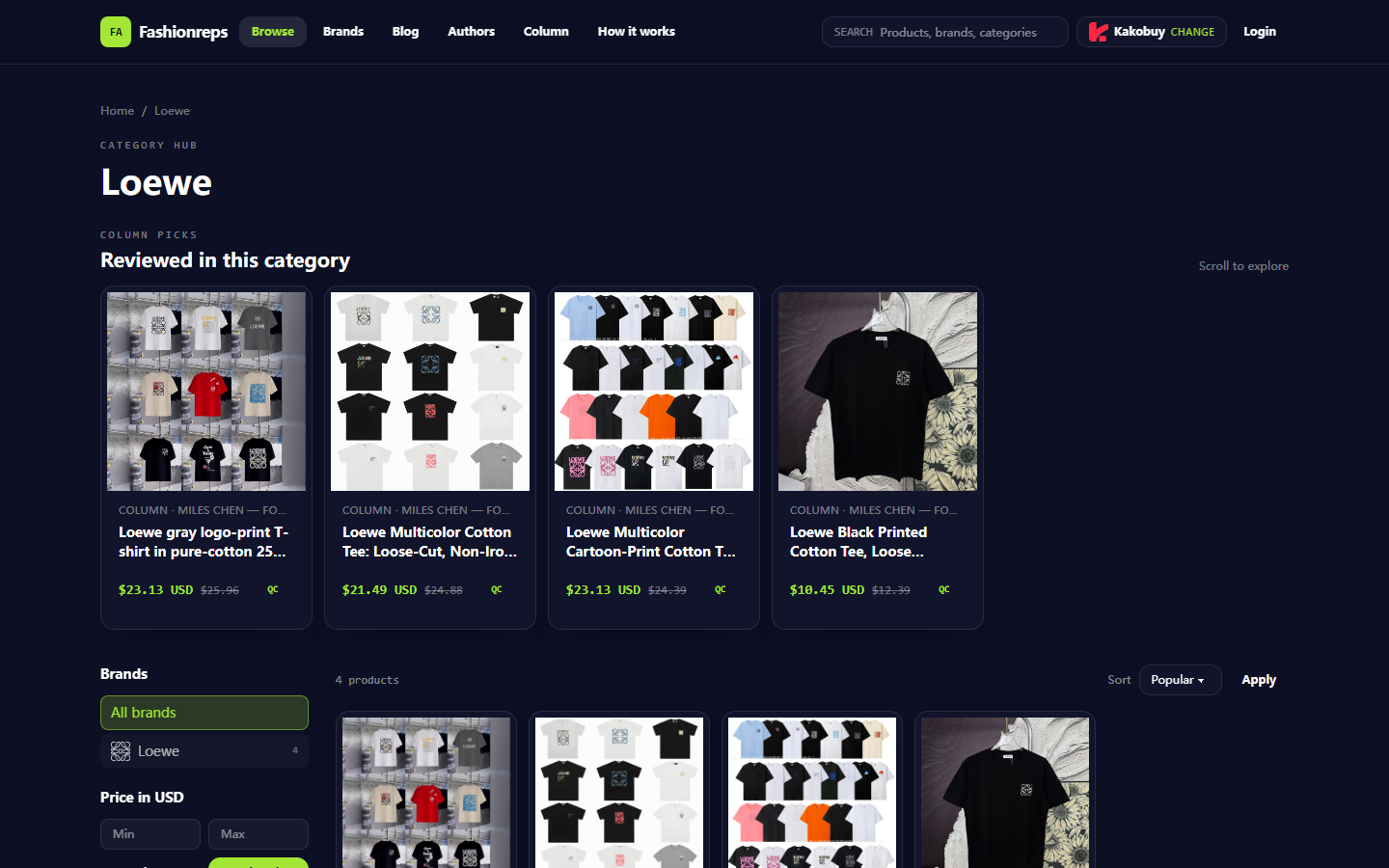
The provided Loewe category page screenshot shows multiple product entries, and the titles and size descriptions of different entries are not entirely identical. This only indicates that there are multiple candidate records on the category page; it does not prove that they are the same product, nor can the category page alone confirm the real-time variants of the detail page. To determine a conflict, you must save the specific detail page and the entry path together. 🧩
Distinguish between page delay, missing fields, and real conflicts
Page delay usually manifests as: after clicking an option, the image or text has not updated within a short time, but after refreshing the state becomes consistent, or different entry points show the same content later. In this case, record the waiting time and refresh result, and do not treat the first non-update as a final conclusion.
Missing fields usually manifest as: the page does not list colors, sizes, or variant rules, or only has editorial titles without interactive options. Missing fields do not mean the color or size does not exist; it only means the page currently cannot confirm it. In this case, write the status as "not displayed" or "cannot be confirmed from the page," not "out of stock."
Real conflicts require stronger evidence. For example, the same page clearly shows a certain color option at the same query time, but after switching, the title changes to another color, while the main image always corresponds to a third color; or the same product URL repeatedly shows mutually exclusive size ranges in different parts of the page. Even at this level, it only confirms a page information conflict, not the warehouse physical stock or seller inventory.
You can manage risk with three types of conclusions:
- Confirmed: fields that are directly visible on the page and remain consistent after repeated checks.
- Pending: options exist on the page, but the image, title, or entry is not synced.
- Unconfirmable: the page lacks real-time stock, seller variant details, or warehouse photos.
Inventory and variant boundaries that cannot be confirmed from the page alone
Fashionreps product display fields cannot alone prove the following:
- Whether a certain color is still in stock.
- Whether a certain size can actually be ordered.
- Whether the image corresponds to the current batch or current seller inventory.
- Whether the size range in the product title includes every purchasable size.
- Whether the external shopping agent has obtained the latest color and size information.
- Whether the physical item received by the warehouse exactly matches the page image.
If a color option exists but stock cannot be confirmed, treat it as a candidate variant, not a purchase promise. If a size only appears in the title without a selectable control, do not write it into the order notes as a confirmed specification. For high-risk or high-priced items, it's best to have the agent confirm the color, size, and orderability before making payment.
When to contact site support and what evidence to submit
When the same product URL still shows field conflicts after repeated checks, or when the external agent page cannot identify the color and size, contact the official support channel of the current shopping agent. Prioritize using the agent website's product inquiry, order inquiry, or customer service entrance, and submit the minimum but sufficient evidence:
- Product page URL.
- Complete product title.
- Query time and time zone.
- The specific field where the conflict occurs.
- Screenshots before and after selecting the color and size.
- The single question you want confirmed, for example, "Is black available in size M for order?"
If the problem exists only in the Fashionreps category title, image, or page display, while the agent page information is normal, you can report the page issue through the official contact channel provided on the Fashionreps page. When providing feedback, state that this is a display field verification request, and do not submit order numbers, payment cards, ID documents, or complete shipping labels. Do not post personal information or unredacted order screenshots in public comment areas. 🔒
Final action: gather evidence, switch candidates, or pause
After completing the check, choose only one action:
- Gather evidence: the page was only briefly delayed, or a refresh, entry comparison, and color switch record is missing. Complete the screenshots and time records before judging again.
- Switch candidates: multiple entry points consistently point to different records, and the current page cannot stably explain the color-size correspondence. Choose a candidate product with more complete information and clearer field synchronization.
- Pause: colors, sizes, and images still conflict with each other, and the agent cannot confirm an orderable variant; or the product is high-priced and a wrong variant would cause significant loss.
Do not guess colors to complete an order, do not treat title ranges as stock proof, and do not "test" the page by repeated clicking, repeated submissions, or multiple payments. The minimum condition to continue is: the product URL is stable, the target color and size can be clearly described, and the agent can confirm that variant can be processed. Otherwise, pausing is itself a reasonable result.
Continue reading