From the blog
Jordan Shoe Shipping: Verify Weight, Size, and Route Limits
Don't just look at the shoe's product price. Whether Jordan sneakers are suitable for continued shipping depends on the warehouse's actual measured weight, oute...
Don't just look at the shoe's product price. Whether Jordan sneakers are suitable for continued shipping depends on the warehouse's actual measured weight, outer packaging dimensions, shoe box handling, destination, and available routes. Without this information, any specific shipping cost or total cost cannot be reliably estimated.
First, lock down the current package conditions
Before submitting the package, write down the following conditions clearly:
- Which specific pair of shoes, along with the corresponding order or product page.
- Destination country, region, and postal code. Different destinations may correspond to different routes and restrictions.
- Whether to keep the original shoe box, whether the shoe box needs reinforcement, and whether compression or replacement of outer packaging is allowed.
- Whether it will be combined with other items. After combining, you cannot continue to treat the single shoe's weight and dimensions as the data for the entire package.
- The time of inquiry and the currency displayed on the page. Routes, prices, and restrictions may change over time.
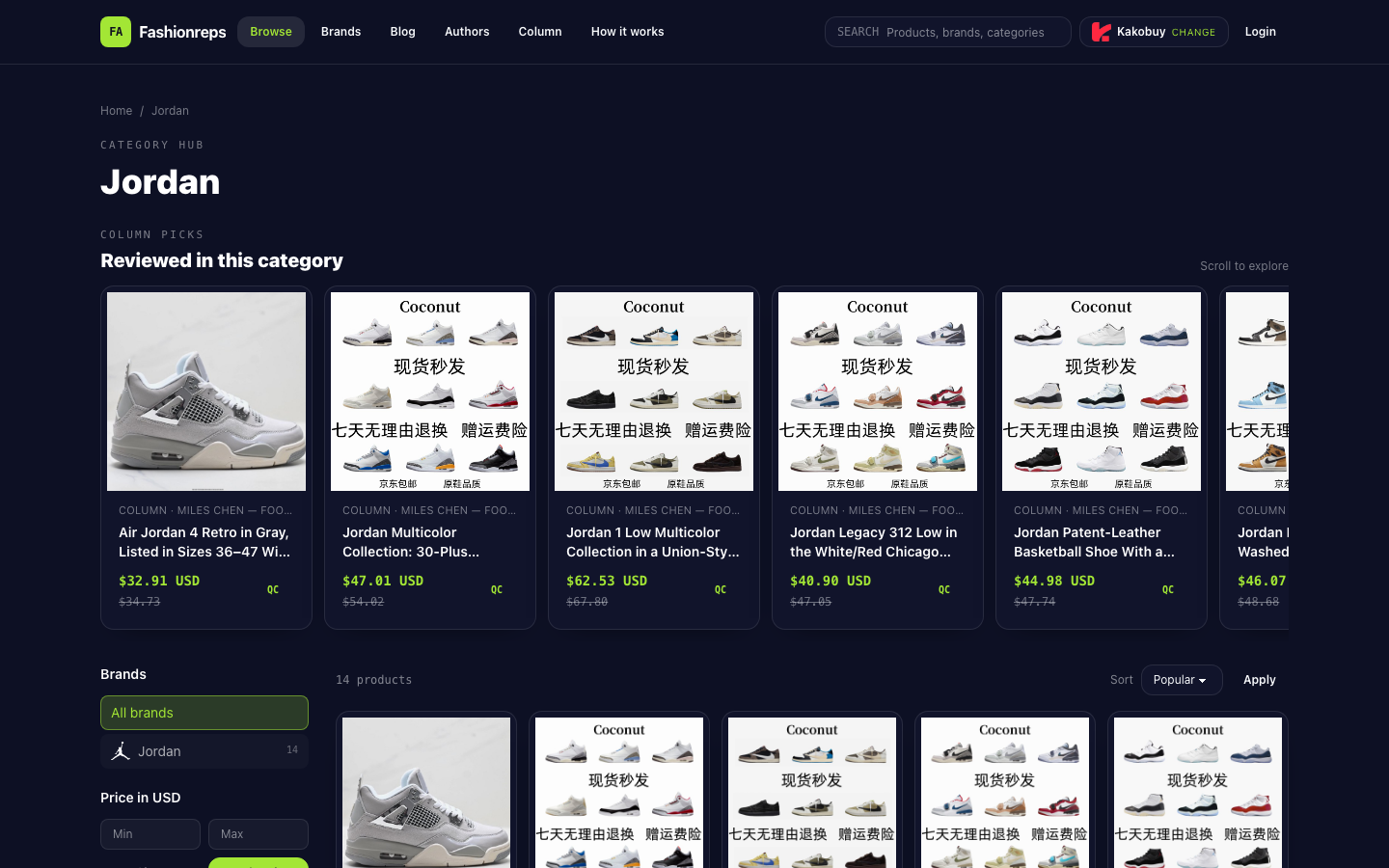
Fashionreps' Jordan category page shows various shoe models and reference prices, for example, visible items have prices like $28.21, $32.91, and $62.53. These can only serve as product price references and cannot directly represent the packaged shipping cost, nor can they prove that a certain route will definitely accept this package.
Four types of data that must be completed from the warehouse
1. Actual weight
Prioritize recording the package weight after warehouse weighing, not the estimated weight on the product page. At least distinguish the following states:
- Weight of a single shoe or single box.
- Weight after keeping the original shoe box.
- Weight after removing the shoe box or changing packaging.
- Total weight after combining packages.
If you only have the product price and no actual measured weight, you cannot determine the chargeable weight, nor can you compare different packaging options.
2. Outer packaging dimensions
You need to record length, width, and height, and confirm whether the unit is centimeters or inches. There may be cushioning materials, cartons, or waterproof bags outside the shoe box, so the shoe box dimensions do not necessarily equal the final package dimensions.
The common risk for shoes is not simply being overweight, but being large in volume causing the chargeable weight to be higher than the actual weight. Whether it is calculated based on actual weight, volumetric weight, or the greater of the two, it must be based on the target route's instructions or the settlement page, not by applying a fixed formula based on experience.
3. Shoe box status
The shoe box is one of the main variables affecting volume. Before submission, you should clearly choose or confirm:
- Keep the original shoe box;
- Keep only the shoes and change to simplified packaging;
- Fold the shoe box and send it along with the package;
- Whether it is allowed to remove extra cartons, hang tags, or non-essential packaging.
Do not assume that "removing the shoe box" is definitely cheaper. It may reduce volume, but it may also change the level of protection, declaration description, or route acceptance conditions. Ultimately, it still depends on the packaging options provided by the warehouse and the route settlement results.
4. Chargeable weight and billing method
Confirm the following questions with the warehouse or on the route page:
- What is the billing unit;
- Is there a minimum chargeable weight;
- Is billing based on the greater of actual weight and volumetric weight;
- Does it require segmentation, zoning, or calculation by package type;
- Does the settlement page show estimated shipping cost or the final payable amount;
- Is it possible to adjust the fee after subsequent weighing or rechecking.
If the page only shows the route name without explaining the billing logic, you can only record it as "to be confirmed" and cannot infer the shipping cost on your own.
Check the target route in order
Step 1: Confirm available routes for the destination
After filling in the shipping address, check the routes actually listed by the system, and do not just refer to screenshots from other countries or other times. The route list itself only indicates that the current page provides options and cannot alone prove that the route accepts all Jordan shoe packages.
Step 2: Check category and packaging restrictions
Focus on looking for instructions related to shoes, replicas or brand logos, boxed items, oversized packages, and special packaging. If the route page does not clearly explain, you should confirm with customer service: whether this product category can be shipped, whether the shoe box is restricted, whether a specific declaration method is required, and whether there are additional requirements for the destination.
Until these questions are clearly answered, do not treat "being able to select the route" as "having confirmed it is safe to ship."
Step 3: Check the shipping cost calculation page
Enter the confirmed weight, dimensions, destination, and packaging status into the official calculator or the settlement page for submitting the package, and keep the time of inquiry. If the page requires selecting a currency, record the displayed currency; if it only shows an estimated amount, also note its nature.
Do not combine product reference price, shipping cost, service fee, payment fee, packaging fee, tax, and exchange rate into one number. The currently verified Jordan category page provides some product reference prices, but it does not provide the actual measured weight, dimensions, route shipping cost, service fee, payment fee, packaging fee, tax, or exchange rate for this package, so the total cost cannot be calculated based on this.
Step 4: Confirm taxes and destination responsibilities
If the shipping page does not explicitly include taxes, treat taxes as an unconfirmed item. Also confirm whether there are conditions such as destination customs clearance, additional taxes, returns, or route surcharges. Without official instructions, you should not give a specific tax rate or final amount.
Stop conditions before submission
If any of the following situations occur, it is recommended to pause submission and complete the information or obtain customer service confirmation:
- No final package weight;
- No final outer packaging dimensions;
- Unclear whether to keep the shoe box;
- The route page does not clearly accept the product category;
- The settlement page does not explain the calculation method for actual weight and volumetric weight;
- Destination, currency, or inquiry time is missing;
- Shipping cost is only a third-party estimate and has not been verified by an official calculator or settlement page;
- Taxes, surcharges, or conditions for rechecking and adjusting prices are not stated.
When you can continue to submit
Only when the package conditions are fixed and you can simultaneously see the destination, actual measured weight, outer packaging dimensions, shoe box status, available routes, billing method, and settlement amount is it appropriate to proceed to the next step. If any one of these items is still missing, the safest choice is to first ask the warehouse or route customer service, rather than using the product page price to replace missing logistics data.
Based on the currently verifiable information, the Fashionreps Jordan page is sufficient to prove that relevant shoe models and some USD reference prices exist on the page, but it is not enough to prove the stock of a particular pair of shoes, available routes, shipping costs, or taxes. Whether to continue submitting the package should be based on the warehouse's actual measured data and the official settlement results of the target route.
Continue reading