From the blog
How to Check Vans Coupon Terms Before Checkout
First, Confirm Which Item You're Looking At To determine if a coupon can be used, the first step is not to search for a code, but to lock down the specific item...
First, Confirm Which Item You're Looking At
To determine if a coupon can be used, the first step is not to search for a code, but to lock down the specific item, variant, and ordering platform. The item page verifiable here corresponds to a Vans black backpack, labeled "Classic black backpack of Vans," with SKU SPU-QIZA1F92VF and QC images provided. This page alone only proves the item listing and QC information, not that a coupon, discount amount, or applicable conditions currently exist.
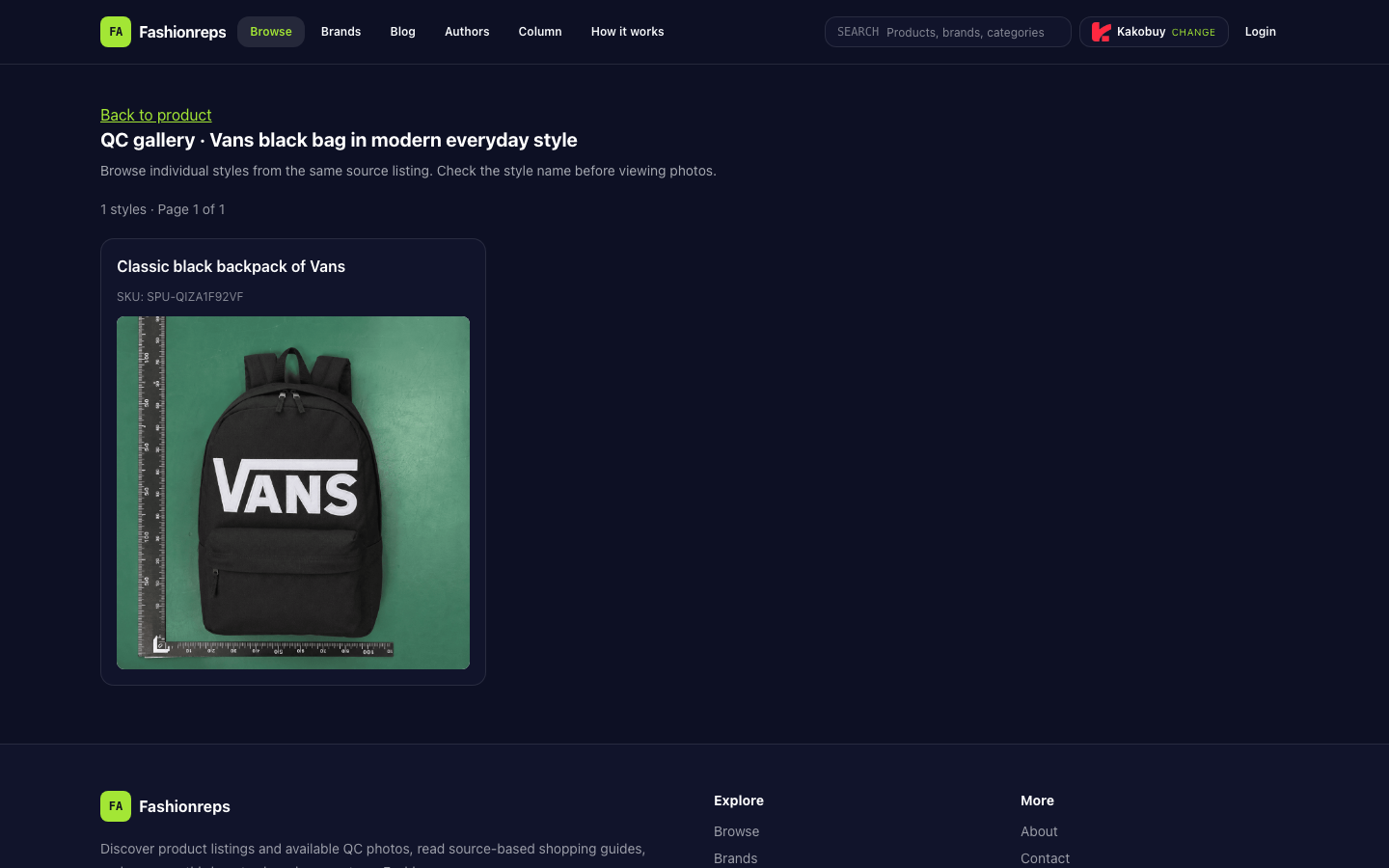
Before placing an order, record the following information:
- Item name and SKU: Confirm the coupon conditions apply to this item, not other styles on the same source page.
- Color, size, or other variants: Some coupons exclude specific variants.
- Item unit price and quantity: Don't treat the amount shown on the item page as the final amount due.
- Currently selected shopping agent: Fashionreps page states that purchase, payment, and shipping are handled by an external shopping agent website, so coupon usability must be determined by the agent's checkout page.
Check Five Types of Conditions in Order
1. Validity Period
Only accept validity period information visible on the current shopping agent page or checkout process. If there are only old screenshots, paraphrased text, or inaccessible campaign pages, you cannot determine the coupon is still valid.
Pay attention to time zone, start time, and end time. When nearing the deadline, base your judgment on the system's status at the time of order submission, not on the prompt seen when adding to cart.
2. Minimum Spend
Confirm whether the threshold is calculated based on the item amount or the amount after other discounts are applied. Also confirm whether shipping, service fees, and taxes count toward the threshold. Without current terms, do not estimate eligibility by adding item price and shipping.
If the coupon entry shows "conditions not met," first check the item subtotal and quantity, then check for any fees that are not counted toward the threshold. Do not add items you don't intend to purchase just to meet the threshold.
3. Item or Variant Exclusions
Check item by item for exclusions:
- Specific brands or item categories;
- Clearance, sale, or items already part of a promotion;
- Certain colors, sizes, or variants;
- External item links, pre-order items, or special supplier items.
The current item evidence only confirms the existence of this Vans black backpack listing and SKU, not that it qualifies for any specific coupon. Therefore, until the coupon conditions explicitly list this item and the checkout page shows an actual discount, mark "whether it applies" as pending verification.
4. Whether It Can Be Stacked
Check if the system allows the coupon to be used together with item discounts, store promotions, agent platform promotions, or other coupons. An input box accepting a coupon code does not guarantee that multiple coupons can be stacked.
If selecting one coupon causes another coupon to automatically disappear, record the actually retained coupon and final discount amount. Do not add up face values of multiple coupons to calculate expected savings.
5. Payment Method Restrictions
Some coupons only apply to specific payment methods, account statuses, regions, or new users. When confirming conditions, check whether the current account and actual payment method meet the requirements.
If the coupon disappears after changing the payment method, the original coupon may be restricted by payment method. In that case, use the checkout result after the change as the basis, and do not choose an unacceptable payment method just to keep the discount.
Use a Three-Column Record to Avoid Misjudgment
You can create a simple record before placing an order:
| Confirmed | Pending Verification | Not Usable |
|---|---|---|
| Item name, SKU, variant, and current cart amount | Validity period, minimum spend, exclusions, or stacking rules lack current explanation | Checkout page clearly indicates not applicable, expired, or conditions not met |
| Coupon entry visible and conditions explanation accessible | Whether item is excluded not yet clear | Entering code shows invalid, zero amount, or coupon automatically revoked |
| Checkout page shows specific discount amount | Payment method restrictions not yet verified | Still unusable after switching to an eligible payment method |
"Pending verification" does not mean "usable." Until an actual discount appears on the final checkout page, do not include it in your budget, nor assume you have obtained a discount.
Final Checkout Page Is the Sole Effective Judgment
Before submitting payment, check in order:
- Item name, SKU, variant, and quantity have not changed.
- Coupon entry shows "applied," not just "entered" or "claimed."
- Coupon amount appears as a separate discount line item.
- Item subtotal, service fee, shipping, tax, and final total have all been recalculated.
- Actual payment method does not trigger coupon revocation.
- No prompts about insufficient minimum spend, item exclusion, coupon expiration, or non-stackability.
Only when the final total has actually decreased due to this coupon can you mark the coupon as "effective." If the page still shows the original amount or the discount amount is not separately listed, stop payment and first gather evidence for the conditions.
Conclusion Based on Current Evidence
Currently verifiable materials confirm a Vans black backpack item listing and its QC page, and confirm that Fashionreps delegates purchase, payment, and shipping to an external shopping agent. However, no current official coupon terms, codes, validity periods, minimum spend, exclusions, stacking rules, or payment restrictions are provided.
Therefore, it cannot be asserted that this Vans item currently has an available coupon, nor can a discount be estimated or savings guaranteed. The correct approach is to enter the actual shopping agent's item, cart, and checkout process, record conditions item by item, and use the final total's reduction as the sole effective judgment before payment.
Continue reading