From the blog
erd Product Page Variant Submission Checks
A product page opening doesn't mean the color, size, or other specs were submitted correctly. When an erd product won't add to cart, the cart redirects and spec...
A product page opening doesn't mean the color, size, or other specs were submitted correctly. When an erd product won't add to cart, the cart redirects and specs disappear, or the order path can't continue, first confirm the product variant and order path match, then decide whether to contact support. Don't repeatedly submit.
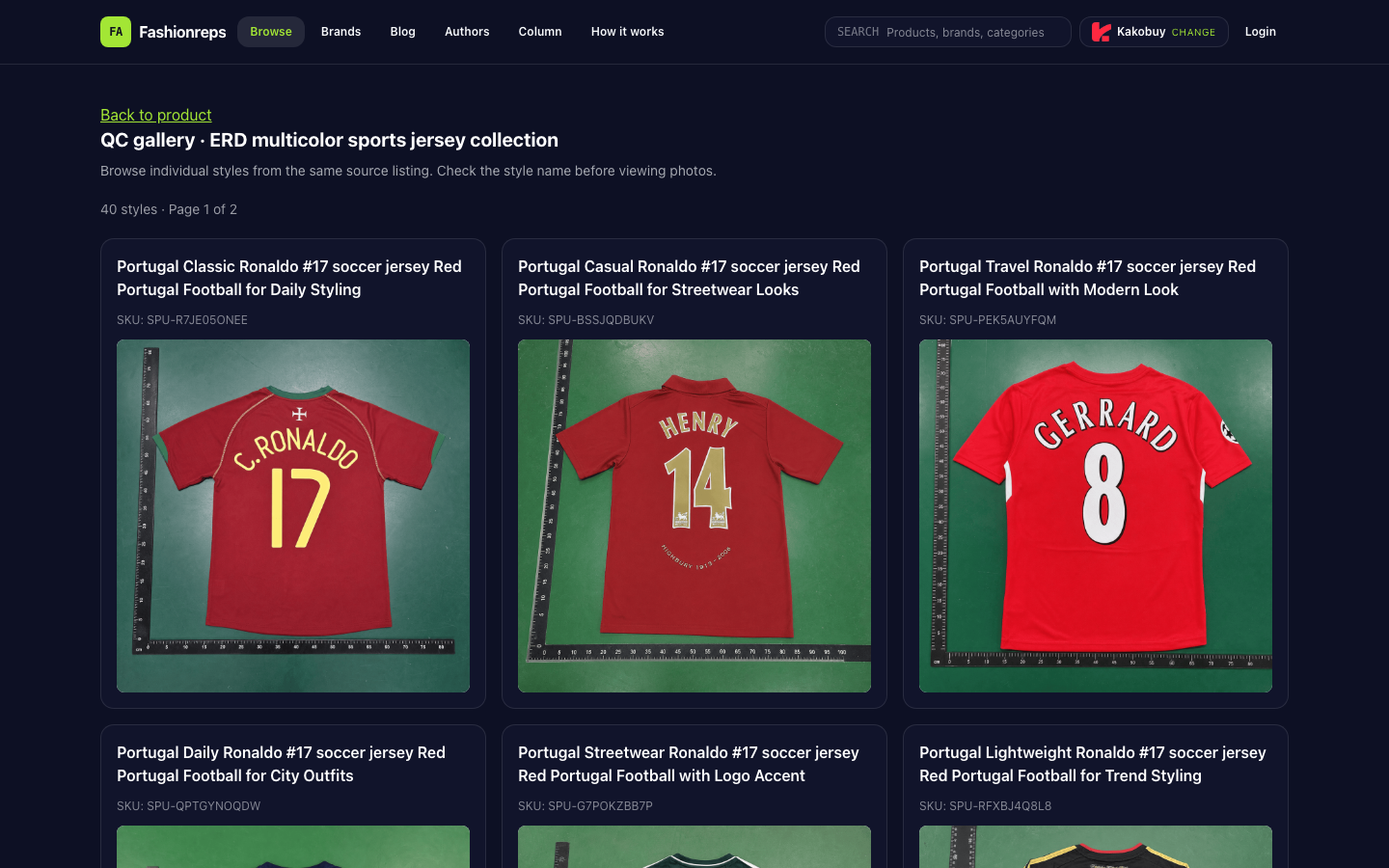
Image: erd product page variant submission check illustration; the image is for explaining the verification approach and doesn't represent actual items, QC, or firsthand evidence.
First, confirm which variant you opened
Fashionreps' ERD multicolor sports jersey collection QC page shows the source list contains 40 styles across 2 pages, and requires checking the style name before viewing the corresponding photos. The page lists multiple Portugal Ronaldo #17 soccer jersey styles, each with different SKUs such as SPU-R7JE05ONEE, SPU-BSSJQDBUKV, and SPU-PEK5AUYFQM.
This means products in the same source list can't be judged as the same orderable variant based only on color, jersey number, or thumbnail. Save the following information first:
- Product title and full link
- Product number or SKU shown on the page
- Currently selected color, size, and other specs
- Full screenshot of the variant dropdown or buttons
- Page state before and after adding to cart
- Error messages, redirect page, and operation time
If the page only shows QC images or a style catalog, you can't assume those specs are definitely purchasable, nor use an adjacent style's SKU as the current product number.
Troubleshoot variant submission failure in order
1. Check whether the page actually accepted the specs
After reopening the product page, don't click buy immediately. First select color, size, or other specs one by one, and observe whether the selected values still appear in the button, product summary, or page URL. If the page resets to defaults after selection, record this behavior and don't repeatedly click submit.
If an option appears empty, unclickable, or inconsistent with the product title, treat it as an unconfirmed spec rather than available stock. Existing sources only prove the page displays multiple styles and QC info, not specific colors, sizes, stock, or prices.
2. Verify the variants belong to the same product
Compare the style name, SKU, color, and images on the page item by item. Especially check:
- Whether the product name jumps from one style to another
- Whether the SKU changes after switching specs
- Whether the spec images correspond to the current style
- Whether the QC page's style name matches the product entry
- Whether you mistakenly added another style from the same source list to the cart
If the product page is accessible but the variant names, SKUs, or images don't match each other, pause the order. When identities aren't aligned, don't pay first and then request a spec change.
3. Check the fields after cart redirect
Some submission issues only appear after adding to cart. In the cart, recheck the product title, style, color, size, quantity, and product link; don't just look at the main product image.
If the cart redirect results in empty spec fields, reverts to defaults, or shows a different product title than the original page, save screenshots before and after the redirect, and record both page URLs. Then identify the issue as "fields not confirmed after submission" rather than concluding the website is broken.
4. Confirm the order entry point is consistent
The Fashionreps page notes the product's buy button leads to your chosen shopping agent, and orders, payment, and shipping are handled by the agent's site. So the product discovery page, cart page, and final order page may not be the same system.
After entering the agent page, recheck the product link and variant fields. If the agent page asks you to re-enter color or size, don't assume the previous page's selection was automatically transferred. Reconfirm product identity and specs on every cross-page transition.
5. Rule out login or browser state effects
Without changing product info, you can check in order: login status, whether the page expired, whether the browser blocks pop-ups, and whether specs remain saved after reopening the page. Don't change multiple conditions at once, or you won't know which step changed the result.
If specs still can't be confirmed after using a different browser or device, stop repeated submissions and keep the earliest and latest reproduction records. Just because a button won't open or submission fails doesn't prove the target site is malfunctioning.
When to contact support, and what to submit
When the page variant, cart fields, and agent order entry can't stay consistent, consult the shopping agent actually handling the order or the target site's available support channel, depending on which page the error occurs on. The Fashionreps page itself is for product discovery and QC info; orders, payment, and shipping are handled by external agents.
When submitting a support request, provide:
- Full product link
- Product title and SKU
- Selected color, size, and other specs
- Screenshots before and after selecting variants
- Cart or order page screenshots
- Complete error message
- Reproduction steps and occurrence time
- Browser, device, and login status used
Don't just send "can't order" with no details, or ask customer service to directly modify the order without explaining the original specs. That mixes page issues, variant issues, and order entry issues.
When to stop operations
Stop repeated submission and payment if any of the following occurs:
- The current page can't confirm specific color, size, or other specs
- SKU, product title, and images don't match
- Specs disappear or are replaced after adding to cart
- Cart redirects to a different product or variant
- Agent order page can't display the original product info
- Support hasn't confirmed specs but the page demands payment
- You can only select variants by guessing
Before the product identity and specs are confirmed, don't submit the same request multiple times, and don't use another style's QC image as proof for the current product. When uncertain, save links, screenshots, error messages, and time, and wait for a clear reply from support before continuing.
Continue reading