From the blog
Bape Size Mismatch: Step-by-Step Check
When you find that the catalog size, product page size, or image information for a Bape item on fashion-reps doesn't match, don't place an order, make a payment...
When you find that the catalog size, product page size, or image information for a Bape item on fashion-reps doesn't match, don't place an order, make a payment, or repeatedly open multiple purchase links. Your only task is to confirm whether the catalog card, product page, and actual purchase link point to the same item, and determine which information can be used as a basis for ordering and which can only be temporarily marked as pending confirmation.
This article applies to situations where the product name, size range, color, style images, or product description are conflicting; it does not apply to payment failures, warehouse inspection disputes, logistics delays, or return disputes. The current basis for judgment is a record of the visible information on the fashion-reps Bape category page as of October 18, 2026. Prices, inventory, available sizes, agent rules, and link status may change, and the samples in this article should not be treated as current quotes.
What to Confirm in This Bape Product Information Check
First, limit the problem to a verifiable object: under the same product link, does the catalog card and the product page describe the same item, and is the size information sufficient to support selection?
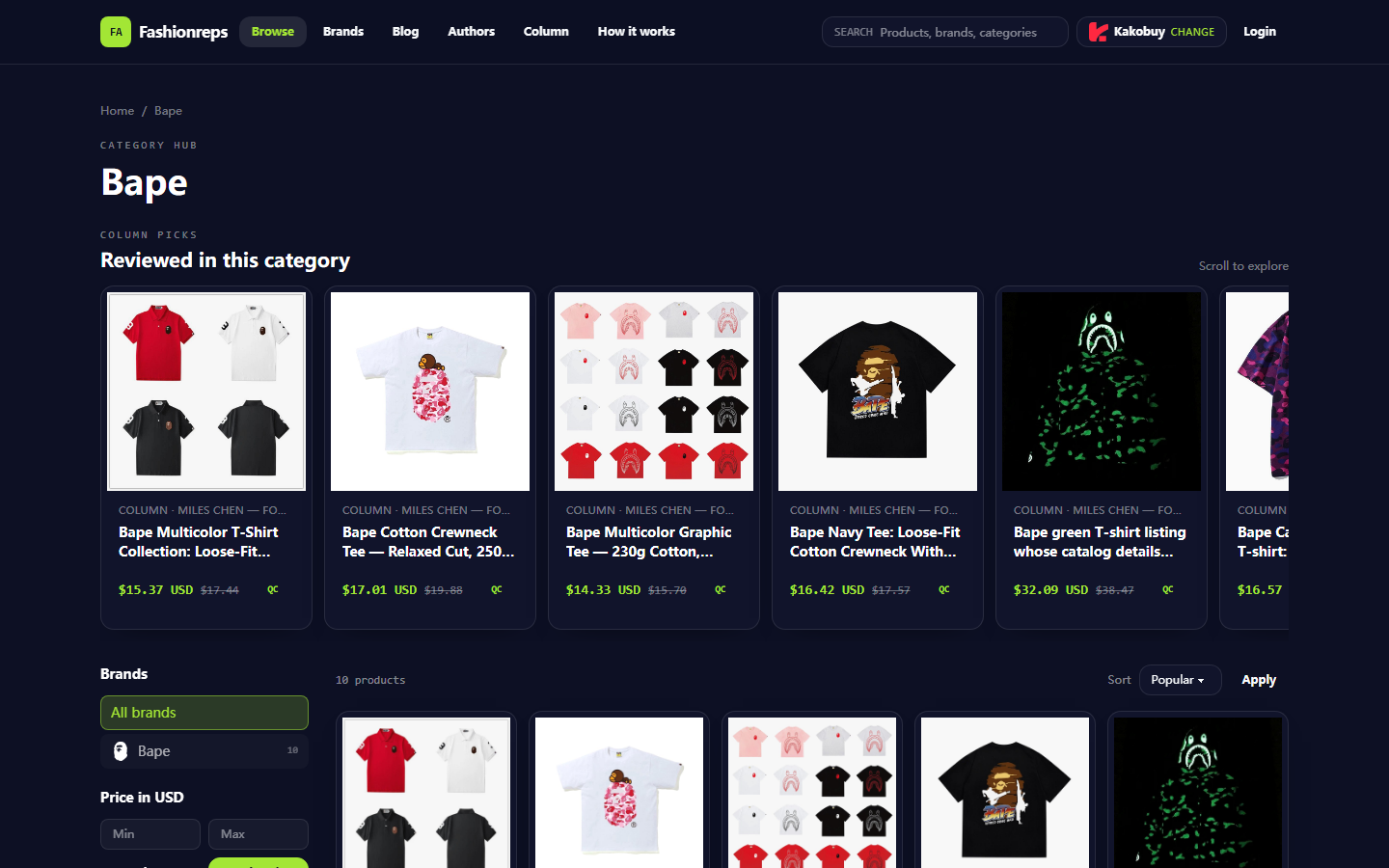
The Bape category page on fashion-reps showed 10 product entries at the time, with cards containing the product name, reference price, some material or fit descriptions, and size range. The page had a green T-shirt title, but the description pointed to a black and white colorway with a fleece-lined zip-up hoodie. This only indicates an obvious content correspondence issue at the catalog level; it cannot be used to conclude that the product page, inventory, or actual shipped item is definitely wrong. 🧭
After the check, you should be able to answer three things:
- Whether the catalog card and product page use the same product name, image theme, and product link.
- Whether the size refers to garment measurements, suggested weight range, or just indicates available specifications.
- Whether you should pause ordering and seek confirmation from the target site or purchasing agent before the information is unified.
First Save Evidence of Catalog Card, Product Page, and Link
Record the original state of the page before refreshing, switching agents, or continuing operations. It is recommended to save the following:
- Full screenshot of the catalog card, including product title, image, reference price, size summary, and page URL.
- Screenshot of the product page, at least covering the product title, main image, color, size options, description, and content near the buy button.
- The actual product URL copied from the product page, not just the category page URL.
- Record the date, time, country or region of access, displayed currency, and whether you are logged into the purchasing agent.
- Record whether the page redirected, was blank, failed to load, or was redirected to another product.
Only keep information necessary for judging the product in screenshots. If names, phone numbers, order numbers, payment information, or complete shipping addresses appear, they should be covered first. Do not send personal orders, passports, payment cards, or complete waybills to public discussion areas. 🔒
Specified cover image:
Item-by-Item Comparison Order When Size Fields are Inconsistent
Do not start by guessing fit from letter sizes. Follow the order below to reduce the risk of mixing fields from different products.
Step 1: Compare product identity. Check whether the catalog title, product page title, product number, or end of the link are consistent. If the title only says Bape T-shirt, but the product page shows hoodie, zip jacket, or another clearly different category, pause and do not treat it as a normal size error.
Step 2: Compare size options. Record the size range shown on the catalog page, such as S–XXL; then record the actual clickable options on the product page. Note the difference between "sizes claimed to be available" and "sizes currently in stock." A size appearing in the text description does not mean it is currently purchasable.
Step 3: Compare measurement methods. If the product page provides garment length, chest width, shoulder width, or sleeve length, record the units and measurement positions. Flat measurements, garment circumference, manual measurement errors, and size increments for different sizes cannot be conflated. When the catalog only says "loose fit" or "straight fit," you cannot convert it to specific centimeters on your own.
Step 4: Compare color and style. Size selection must correspond to a specific color and style. Some pages share one image or size chart, causing black, green, and collaboration patterns to be grouped in the same options. If the image, title, or size options do not change synchronously after selecting a color, mark that field as unconfirmed.
Step 5: Compare purchase entry. The Buy button on fashion-reps leads to the purchasing agent of your choice, and orders, payments, and shipping are handled by the agent's website. Therefore, the reference price or card size summary on fashion-reps cannot replace the real-time product information on the agent's order page. 🛒
How to Verify Correspondence of Color, Style, and Images
Break down the page information into four groups, and do not judge by overall impression: product name, main image, color text, style or fit description. If any two of the four groups clearly point to different products, pause operations.
For example, if the product title says green T-shirt, but the description mentions a black and white zip hoodie and lining information, this is not a simple "green display anomaly"; the product identity has not been confirmed. Do not use image color to replace text, nor use common brand styles to fill in missing information on the page.
Also check whether the image belongs to the main product. Thumbnails may be category placeholders, images of the same style in different colors, old version images, or reused images of other products. Images can help confirm patterns and styles, but cannot prove material, weight, size accuracy, or stock status.
How to Record Page Update Time and Link Status
Write down the date and page status for each verification. At least record the following items:
- Date and time of access: used to distinguish the current page from old screenshots.
- Page URL: save the category page, product page, and agent product page URLs separately.
- Page status: opened normally, redirected, 404, blank page, visible only after login, or incomplete loading.
- Information status: consistent, partially consistent, clearly conflicting, or unable to confirm.
- Price and stock: only record what the page showed at the time, and note the currency and applicable conditions.
A page opening does not mean the content has been checked; the category page displaying does not mean the product page link is still valid. If the information changes after refreshing, keep both before and after records, and treat the latest visible page as pending confirmation, rather than automatically assuming the later one is the correct version. ⏱️
Which Differences are Pending Confirmation Rather Than Product Facts
The following situations cannot be directly written as product facts:
- Catalog shows S–XXL, but the product page does not have a complete size chart.
- Price has an old price and reference price, but no validity period stated.
- Image shows a certain color, but text lists multiple color options.
- Product title says T-shirt, but description includes hoodie, jacket, or zip-up terms.
- Page has a Buy button, but the agent page shows a different product, is out of stock, or cannot be opened.
- A size can be clicked, but the corresponding color and style for that size are not confirmed.
These situations should be marked as "pending confirmation," not rewritten as "runs large," "ample stock," "image is the actual item," or "agent will definitely ship according to catalog." Without measurement records, do not claim to have tried on, purchased, received, or completed warehouse inspection.
When to Contact the Target Site and Prepare Necessary Information
If the product identity, size, or purchase link is still inconsistent, first contact the official customer service or product support channel of the site that owns the page; if the problem occurs on the order page after clicking the Buy button, then contact the customer service of the purchasing agent that actually handles the order. When explaining the issue, provide only necessary information: product page URL, catalog screenshot, product page screenshot, access time, conflicting fields, and the specific question you want confirmed.
You can ask in this order:
- Does this catalog card correspond to the current product page item?
- Is the size range in the catalog still valid?
- Does the size chart on the product page apply to all colors and styles, or only to one option?
- Are the product name, image, and size shown on the agent's order page consistent with the original product?
- If the page information cannot be updated, should I cancel the current selection and wait for confirmation?
Do not ask customer service to guarantee fit based solely on a blurry screenshot, and do not send personal sensitive information to unofficial contacts. Keep the original page records until customer service clearly confirms.
Conditions for Pausing Order and Avoiding Repeated Operations
If any of the following occurs, pause ordering, payment, and repeated adding to cart:
- Product title and image clearly point to different categories.
- Catalog size range differs from product page size range, and there is no explainable version difference.
- After switching colors, the product image or size options do not change, and it is impossible to confirm whether the selection takes effect.
- Product page redirects to another product, blank page, 404, or cannot save the actual product URL.
- The product name, size, or color on the agent's order page is inconsistent with the original page.
- Customer service has not confirmed, but the page requires immediate payment or order submission.
Do not "test" results by repeatedly refreshing, clicking Buy, or opening multiple agent pages simultaneously, as this may cause duplicate orders, duplicate inventory locks, or cart records that are difficult to reconcile. If an order has already been submitted, first check the order status and whether a unique order number was generated, then decide whether to contact support; do not directly place a new order.
Final Action: Complete a Bape Information Consistency Checklist
Before continuing the purchase, use a short record for the final judgment:
- Product name: catalog page and product page are consistent or an explanation has been obtained.
- Product type: categories such as T-shirt, hoodie, jacket have no conflict.
- Color and style: text, image, and selected options correspond.
- Size range: catalog summary, product page options, and size chart have been checked item by item.
- Measurement units: centimeters or inches are clear, and the measurement object and method are not confused.
- Link status: actual product page and agent purchase page are both accessible.
- Time record: the verification date of October 18, 2026 has been noted, and prices, inventory, and policies still need to be subject to the current page.
- Risk decision: pause operations when information is not unified, and do not fill in product facts with guesses.
The value of completing this checklist is not to guarantee fit, but to reduce mispurchases, duplicate payments, and subsequent disputes caused by catalog mismatches. It is more suitable for buyers who find page information conflicts and need screenshot verification; if you already have a clear official size chart, real-time inventory, and a consistent agent order page, there is no need to repeatedly submit customer service requests for formality.
Continue reading