From the blog
adidas Jersey QC Missing on fashionreps: How to Fix
What This adidas Jersey Troubleshooting Guide Solves When you see adidas items on fashion-reps.net but cannot find the corresponding QC images, don't immediatel...
What This adidas Jersey Troubleshooting Guide Solves
When you see adidas items on fashion-reps.net but cannot find the corresponding QC images, don't immediately interpret "images not showing" as poor product quality, non-existent product, or that the item is definitely fake. This issue may stem from entry location, product correspondence, page status, image loading, or the order not yet reaching the QC stage.
This article addresses one specific problem: how to confirm whether the QC image entry is correct, and whether the images actually belong to the adidas jersey you're viewing. After troubleshooting, you should be able to decide whether to continue verifying, prepare evidence to contact relevant support, or pause subsequent payment, shipping, or after-sales actions.
Verification date for this article: October 11, 2026. Page information and product status may change. Prices, inventory, purchasing agents, order progress, and QC images should all be based on the latest records in the actual opened page and agent account. 🧭
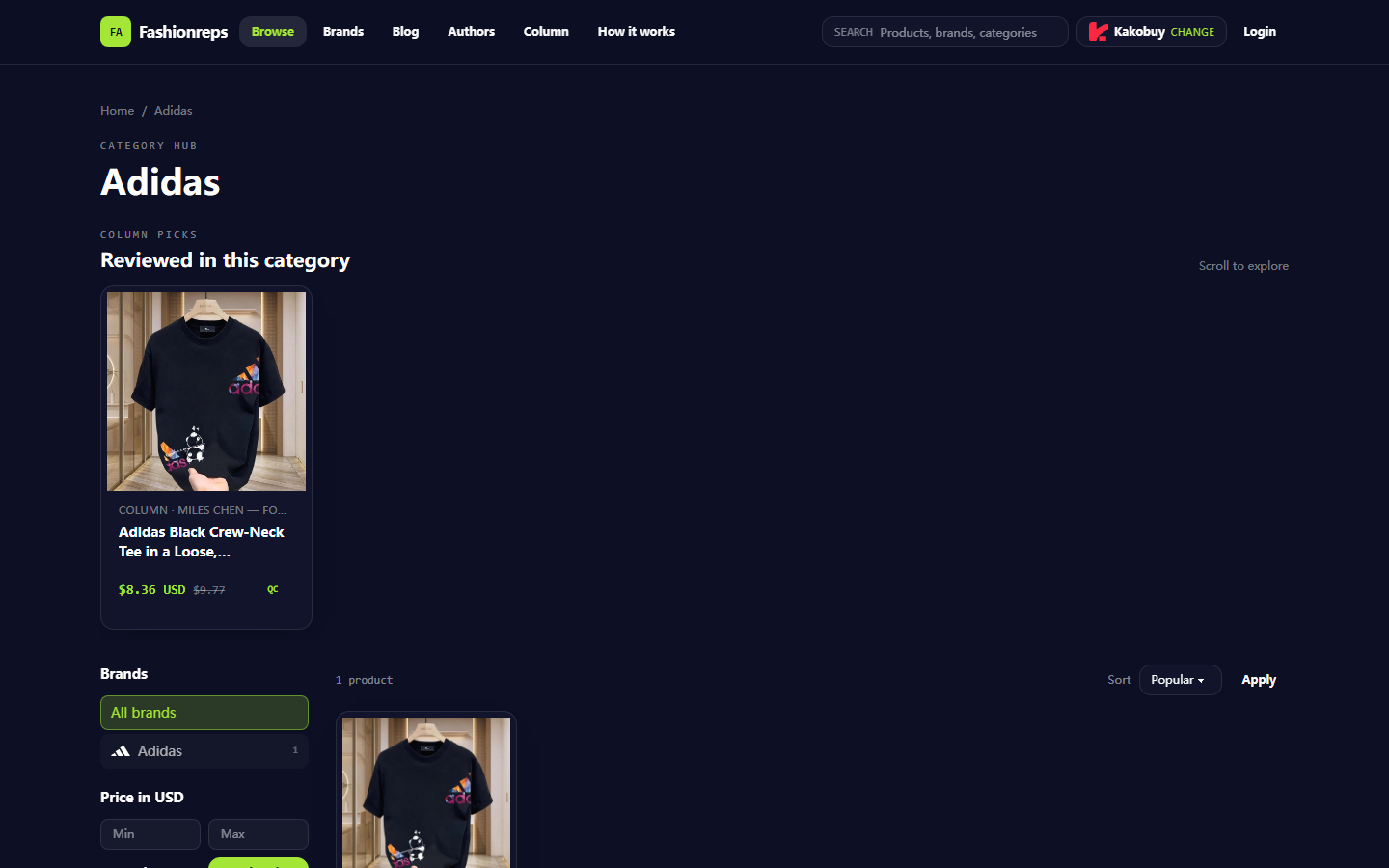
Image: Sample page of Fashionreps adidas category. In the image, you can see brand categories, product cards, reference prices, and QC-related interface prompts, but this does not mean that a certain order has been generated or that corresponding QC images are publicly displayed.
First Distinguish Between Product Page, Order Record, and QC Image Entry
These three locations have different tasks, and mixing them up during inspection is the most common cause of misjudgment.
The product page is for confirming the item itself, including name, style, color, size, seller information, reference price, and purchase button. The purchase button enters the currently selected shopping agent process; orders, payments, warehouse, and shipping are handled by the agent website.
The order record is for confirming whether you actually submitted the corresponding item and whether the order has been paid, purchased, stored, or entered the inspection stage. Without an order number, you usually cannot prove that a set of images is related to your item.
QC images are inspection materials provided by the warehouse or agent at specific process nodes. They may only appear after the order enters the corresponding status, or they may need to be opened from order details, warehouse page, or after-sales entry, rather than directly viewed from the fashion-reps product card.
You can establish correspondence in the following order:
- Record the complete product name, color, size, and page URL on the product page.
- Record the agent name used when clicking purchase to avoid later searching for the order in another agent account.
- Find the corresponding order number, product title, and order time in the agent account.
- Confirm whether the order status has reached the stage where purchase, storage, or QC images are available.
- Only when the order information matches the product information, attribute the images to this adidas jersey.
If you can only see the category page or product card, you cannot infer that order-level QC images already exist. ⚠️
Go Back to fashionreps to Verify Jersey Style, Size, Color, and Page Status
Start by re-verifying from the fashionreps product page, rather than relying directly on search results, browser history, or simplified titles in agent orders.
Focus on checking the following fields:
- Does the product name clearly state adidas and the jersey or specific style?
- Is the color displayed on the page consistent with the color you intend to purchase?
- Does the page list sizes, size descriptions, or other variant information?
- Is the reference price on the product card just a reference value and not the final payment amount?
- Can the page open normally? Are there redirects, blank content, error messages, or repeated refresh issues?
- Does the purchase button currently point to the same agent as the one you actually use?
In the provided adidas category page sample, the page shows the adidas category, a product card, reference price, and QC-related interface text; but the sample itself does not contain your order number, payment status, or order-level images. Therefore, it can help you confirm the category and product entry, but cannot alone prove the QC status of a certain order.
If the page title, color, or size is inconsistent with the order record, pause subsequent operations and re-confirm the product entry. Do not continue payment just because images are missing, and do not submit a quality complaint based solely on an unattributed image.
Check If the Product Detail Page Shows the Correct QC Entry or Status Prompt
After entering the product detail page, first observe which situation the QC entry belongs to:
| Page Phenomenon | More Reasonable Initial Judgment | Next Step |
|---|---|---|
| Only product information and purchase button, no order entry | Still in the product discovery stage | Check orders in the agent account; do not treat the product page as a QC page |
| There is a QC label or button, but no specific images after clicking | May be category filtering, placeholder entry, or images not yet generated | Check order status and product correspondence |
| Can see images, but no order number, product title, or color information | Image attribution cannot be confirmed temporarily | Do not treat it as evidence for your order |
| Order details clearly show product information, but image area is empty | Inspection may not be completed or image load failed | Save order status, check page loading, and prepare evidence for help |
| Page repeatedly redirects, shows errors, or content is empty | Entry or page status abnormal | Record time, page location, and error message; pause repeated submissions |
During inspection, it is recommended to use the same browser account, the same agent entry, and the same order page to reduce title differences caused by cross-platform or cross-account. If the page allows filtering products, select adidas first, then narrow down by product name, color, and size; do not rely solely on brand filter results.
Also confirm whether images are just delayed loading. You can refresh once, wait for the page content to fully appear, and then check whether there is a load failure prompt in the image area. Do not refresh repeatedly, resubmit QC requests, or place duplicate orders, because these actions may create duplicate records but cannot solve the product correspondence issue.
How to Record Image Missing, Load Failure, and Product Correspondence Error Separately
These three phenomena are handled differently. It is recommended to record them separately, not uniformly write "no QC."
Image missing: The page does not show an image area, or clearly indicates that there are no images yet. Record product name, color, size, order number, order status, inspection time, and page location.
Image load failure: The page has an image frame, loading icon, or error prompt, but the image cannot be displayed. Record browser, device, network environment, error text, and whether other order images can be opened. Save screenshots without personal information if necessary.
Product correspondence error: Images can be displayed, but the title, color, size, order number, or product details do not match. This is the most important situation to pause operations, because continuing to use it as evidence for the target product will lead to misjudgment.
It is recommended to use the following short recording format:
- Product: Complete name and style description
- Color and size: Page displayed value and order record value
- Agent: The agent name actually used
- Order: Order number and current status
- QC entry: Where you entered from and what appears after clicking
- Image status: Missing, load failure, or correspondence error
- Verification time: Local time and date
- Actions taken: Refreshed once, switched entry, or stopped operation
Before taking screenshots, cover name, phone number, address, payment information, complete shipping label, and other order privacy. Keep only the parts that can prove product correspondence and page status. 🔒
Do Not Treat Missing Images as a Quality or Authenticity Conclusion
QC image absence only indicates that you currently have no usable image evidence. It cannot directly lead to the following conclusions:
- The product definitely has quality issues.
- The product definitely has not been inspected.
- The product is definitely fake or authentic.
- The seller definitely has not shipped.
- The agent definitely has refused to provide images.
- The product in the images definitely belongs to your order.
Quality judgment requires at least matchable product information, clear inspection materials, and a clear order node. Authenticity judgment also involves brand authorization, product source, and verifiable credentials, not determined by whether images appear.
If the page shows a reference price, do not treat it as the final cost. Payment amount may be affected by product variants, agent service fees, domestic shipping, international shipping, taxes, exchange rates, and route conditions. This article does not make current commitments on these amounts; before actual payment, refer to the agent's settlement page. 💡
What Verifiable Evidence to Prepare When Requesting Additional Photos or Help
If the order has entered a status where QC images should be provided, but images are still missing, you can contact the shopping agent actually responsible for the order or its official support channel. Fashionreps' product discovery page cannot replace the agent's order support system, so when seeking help, explain at which stage the problem occurs.
Prepare the following information:
- The complete name displayed on the product page.
- Color, size, and other variants.
- Agent name and order number.
- Current order status and status update time.
- Specific location of the QC entry.
- Missing or error prompt in the image area.
- A screenshot with privacy covered.
- The specific item you want them to verify, such as "Please confirm whether QC has been completed for this order, or explain from which entry images are expected to be provided."
Do not publicly share complete payment card information, account passwords, ID documents, passports, complete shipping address, or complete shipping label. Support personnel usually only need order identification information and page status, not these sensitive data.
If the other party asks you to repeat payment, resubmit the same order, or provide unexplainable sensitive information, pause first and verify again through the official support entry within the agent website. Do not continue operations based solely on unverified messages in chat software.
Final Action: Additional Check, Contact Official Support, or Pause Subsequent Operations
Use the following judgment to wrap up:
- Product page, order title, color, and size all match, and the order has not yet entered the QC stage: Continue waiting for order status changes; do not treat missing images as abnormal for now.
- Order has entered the relevant stage, and the image area is clearly empty or failed to load: Save evidence and contact the official support channel of the actual shopping agent.
- Images are inconsistent with product title, color, size, or order number: Pause subsequent operations and first request confirmation of product correspondence.
- The page is just a category page or product page without order information: Go back to the agent account to find the order; do not treat the public page as order-level QC evidence.
- Unable to confirm image source, order ownership, or authenticity of the support channel: Pause payment, shipping, and after-sales submission until key evidence is complete.
This article does not prove that fashionreps or any agent is currently experiencing a system failure, nor does it interpret missing images as a quality or authenticity conclusion. The safest approach is to correspond "product entry," "order record," and "QC images" item by item, and then decide whether to conduct additional checks, seek help, or stop based on order status.
Agent Platform Shopping FAQ
1. What is the best way to locate the product I want to buy on fashion-reps?
On fashion-reps you can either enter a single keyword into the search bar or browse through the category page, where items are also sorted by brand. Using longer search phrases generally yields fewer matches compared to shorter ones, but those matches tend to be more accurate. For instance, you could look up "Air Force 1 White," "sneakers," or just "Air Force 1."
Continue reading